Short answer: Here is how to start a YouTube channel in Pakistan: sign in to YouTube with a Google Account, open Settings and click Create a channel. It costs nothing. Then verify your phone number, pick one viewer and one topic, and upload your first video from your phone. Ad income starts at 1,000 subscribers and 4,000 watch hours.
Opening a YouTube channel takes a few minutes. Building one takes years.
Mine has 700+ videos and 377K subscribers today. To build it, I put my time and money into skills, not tools.
So this is the guide I would hand to a friend starting from zero. By the end, you will know how to open the channel, publish your first video, grow it, and get paid in a Pakistani bank.
One date matters before we begin: 1 February 2027. From that day, a new channel needs 8,000 watch hours to earn from ads, not 4,000. YouTube announced it, and we checked the page on 21 November 2026.
That is not a reason to panic. It is a reason to start this week and not next year.
Key takeaways
- A YouTube channel is free to create. You need a Google Account, a phone and one clear topic.
- Verify your phone number on day one. It unlocks custom thumbnails and videos longer than 15 minutes.
- YouTube monetization requirements in Pakistan today: 1,000 subscribers plus 4,000 watch hours in 12 months, or 10 million Shorts views in 90 days.
- From 1 February 2027, new creators need 8,000 watch hours in 365 days or 20 million Shorts views in 90 days. The 1,000 subscribers rule stays.
- AdSense pays Pakistani creators by wire transfer once the balance reaches $100. Your bank then deducts 5% tax under section 154B.
On this page
- How to start a YouTube channel in Pakistan: 2 minute quick start
- Why start a YouTube channel in Pakistan now
- Step 1. Pick one viewer and one topic
- Step 2. Create your YouTube channel (it is free)
- Step 3. Choose your name, handle and channel look
- Step 4. Verify your phone number on day one
- Step 5. Make your first video with the phone you have
- Step 6. Upload your first video the right way
- Step 7. Grow your YouTube channel to the first 1,000 subscribers
- Feeling overwhelmed? Three myths you can drop today
- Step 8. Meet the YouTube monetization requirements in Pakistan
- Step 9. Get paid in Pakistan and handle the tax
- Six mistakes that kill new channels
- Frequently asked questions
- Your next step
How to start a YouTube channel in Pakistan: 2 minute quick start
Short on time? Here is the whole guide in seven lines.
- Pick one viewer and one topic you can make 50 videos about.
- Sign in to YouTube, open Settings, and click Create a channel.
- Choose a name and a handle of 3 to 30 characters.
- Verify your phone number at youtube.com/verify.
- Film your first video on your phone, near a window, with clear sound.
- Upload it with a clear title, a custom thumbnail and the right audience setting.
- Publish at a pace you can keep, then study what viewers watch.
Now the detail, step by step.
Why start a YouTube channel in Pakistan now
The audience is already here, and the entry bar is about to rise.
YouTube had 60.6 million users in Pakistan in late 2026, according to DataReportal. That is your possible audience before you count viewers abroad.
Now the bar. Say your average view lasts 5 minutes. This is an example, not a forecast.
- Today: 4,000 watch hours is 240,000 minutes, or about 48,000 views.
- From 1 February 2027: 8,000 hours is 480,000 minutes, or about 96,000 views.
Same channel, double the work. A channel that joins the program before that date keeps its status, YouTube says.
Can you still make it in time? Maybe not. But every video you publish now is watch time you will not have to earn later.
Step 1. Pick one viewer and one topic
Choose your viewer before you choose your camera. A niche is a topic plus a person.
“Tech” is a topic. “Phone reviews under Rs 50,000 for Pakistani students” is a niche. You know who is watching and what they want.
YouTube’s own creator guidance says it plainly: “To get your videos seen, we recommend focusing on what your audience likes.”
Which four questions should you answer first?
- Who is my one viewer? Age, city, what they know, and what problem they want solved.
- What do I promise them? One sentence. For example: “Every video helps a beginner earn a first dollar online, without scams.”
- Can I make 50 videos on this? If ideas run out after ten, the niche is too narrow.
- Will I enjoy it in two years? Growth takes time, and boredom shows on camera.
Urdu, English or both?
Speak the language your viewer thinks in. Urdu or Roman Urdu speaks to the local audience. English reaches viewers abroad, where you compete with channels from every country.
There is a helper now. YouTube’s automatic dubbing page lists Urdu as a language it can dub into English (checked 21 November 2026). So one Urdu video can reach some English viewers too.
Before you pick a niche, check that it is safe to grow. Channels that push binary options, “signal” groups, guaranteed profit schemes or fake earning apps can grow fast and then collapse with strikes, scam complaints and lost trust. I do not promote any of these, and I suggest you do not either.
Mistake to avoid: changing your niche every week. Give one topic at least ten videos before you judge it.
Step 2. Create your YouTube channel (it is free)
You create a channel inside YouTube itself, with the Google Account you already use for Gmail.
Without a channel you can watch, like and subscribe. To upload, comment or make playlists, YouTube Help says you need a channel.

How do you create a YouTube channel step by step?
These are YouTube’s own steps for a personal channel, checked on 21 November 2026.
- Sign in to YouTube on a computer or the mobile site.
- Click your profile picture, then Settings.
- Go to the Account section and select “Add or manage channel(s)”.
- Click “Create a channel”.
- Choose a profile picture, then type your name and handle.
- Click “Create channel”.
That is it. The page asks for no fee and no documents.
Personal channel or brand channel?
A personal channel is managed by you alone. A channel on a Brand Account can have more than one owner or manager.
Starting alone? A personal channel is enough. If you plan to work with an editor or a partner later, the Brand Account route lets more than one person manage the channel.
Mistake to avoid: opening the channel on a borrowed Gmail. Use an account you control, with your own phone number on it.
Step 3. Choose your name, handle and channel look
Your handle is your address on YouTube, so choose it with care. It starts with “@” and becomes your link: youtube.com/@yourhandle.

YouTube’s page on handles sets the rules:
- 3 to 30 characters, using letters and numbers.
- Underscores, hyphens and periods are allowed, but not at the start or the end.
- It cannot look like a URL or a phone number.
- It must not be in use already.
Keep it short and easy to say out loud. If people cannot spell it after hearing it once, pick another.
You can change your name or handle later, but only twice within 14 days. So think first, then type.
What sizes do the profile picture and banner need?
YouTube’s branding page gives the numbers. Look at the size limits before you design anything.
| Item | What YouTube asks for | Free way to make it |
|---|---|---|
| Profile picture | JPG, GIF, BMP or PNG, up to 15 MB, shown at 98 x 98 px | A clear photo of your face, taken in daylight |
| Banner | At least 2048 x 1152 px, 16:9, 6 MB or smaller | Any free design app on your phone |
| Handle | 3 to 30 characters | Your name or your topic |
What this means for you: a phone photo and a simple banner are enough. Do not pay a designer on day one.
Then write your channel description. Say who the channel is for and what they will get, in two lines.
Step 4. Verify your phone number on day one
Verification takes one text message and unlocks the features a new channel needs most.
YouTube gives features in three levels, as its feature access page explains. You get the first level when you create the channel. The second needs your phone number.
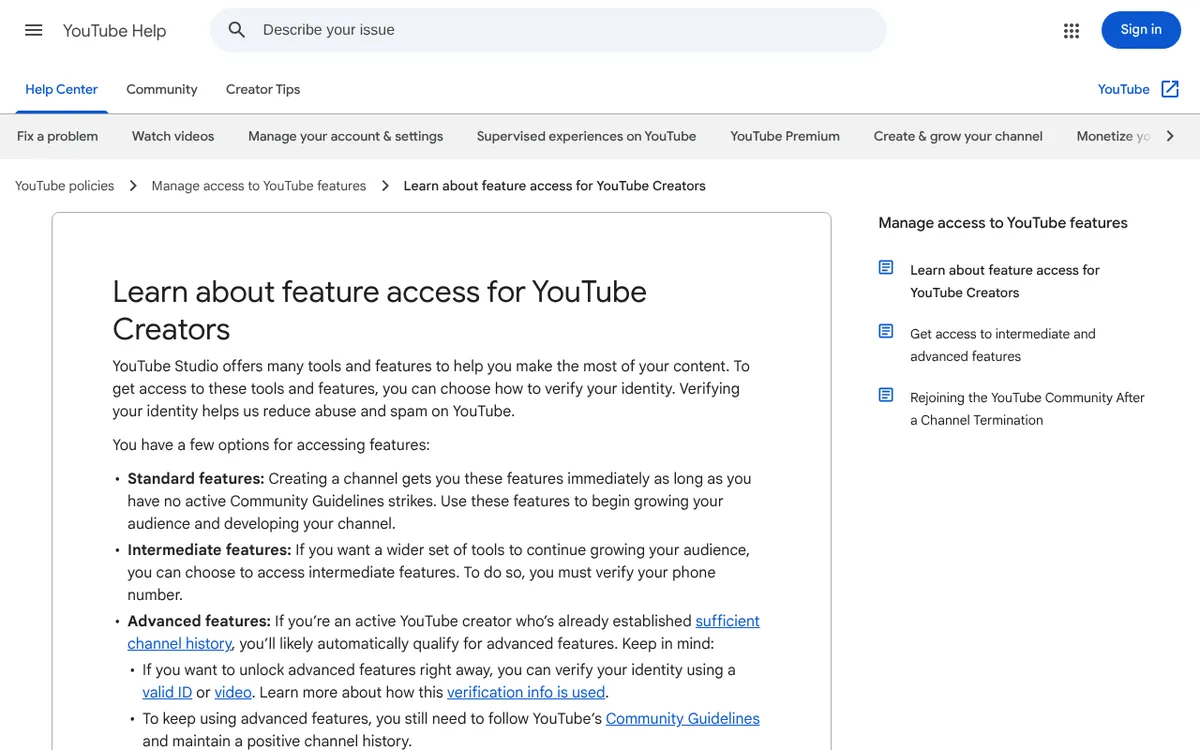
Go to youtube.com/verify on a computer. YouTube sends a code by text message or by an automated voice call. Enter it, and you are done.
Here is what each level gives you. Watch the middle row: that is your day one target.
| Level | How you get it | What it unlocks |
|---|---|---|
| Standard | Create a channel | Uploading videos and Shorts, playlists, posts |
| Intermediate | Verify your phone number | Videos longer than 15 minutes, custom thumbnails, live streaming, podcasts |
| Advanced | Channel history, or ID or video verification | Applying for monetization, pinned comments, chapters, A/B testing, clickable links |
So an unverified channel is stuck with auto picked thumbnails and 15 minute videos. That is a bad trade for one skipped text message.
While you are in settings, turn on 2-Step Verification for your Google Account. The Partner Program asks for it later, and it protects your channel from being stolen.
Mistake to avoid: verifying with a SIM that is not yours. If you lose that number, you can lose access.
Step 5. Make your first video with the phone you have
Your phone is enough for the first videos. Light, sound and a clear topic matter more than a camera.
Here is what I would do first: sit facing a window, hold the phone steady, and speak close to the mic. Record one minute and listen back with earphones. If the sound is clear, you are ready.
Can you start a YouTube channel without investment?
Yes. Everything in this guide up to here costs zero rupees.
I began my own channel the same way, with no money spent, and it still earns for me today. Spend on learning first. Buy gear only when your videos are already working.
Here are the free tools YouTube itself offers, checked on its own pages on 21 November 2026.
| Tool | What it does | Works in Pakistan? |
|---|---|---|
| YouTube app | Records and uploads videos and Shorts up to 3 minutes | Yes |
| YouTube Studio app | Manages your channel from your phone | Yes. From December 2026 the newest Android version needs Android 12 or later |
| Audio Library | Royalty free music and sound effects | Yes, inside YouTube Studio |
| YouTube Create app | Free video editor from YouTube | Not listed for Pakistan yet |
The last row surprises many people, so let us look at it closely.
Is the YouTube Create app available in Pakistan?
Not yet. YouTube’s list of available locations for YouTube Create names 21 countries, including India, Turkey and Indonesia. Pakistan is not on it.

The page says the app “may be available in more countries/regions in the future”. Until then, edit with any free editor on your phone, and check its licence before you publish.
Where do you find free music that is safe to use?
Use the Audio Library in YouTube Studio. YouTube calls its music and sound effects “copyright-safe”.

Open YouTube Studio, select Audio library from the left menu, and download the MP3. If a track has a Creative Commons licence, you must credit the artist in your description.
Mistake to avoid: adding a film song or a trending track from another app. That is how new channels collect copyright claims.
Step 6. Upload your first video the right way
Uploading is simple, but four settings on the details screen decide how your video starts its life.
In YouTube Studio, click Create, then “Upload videos”, and select your file. On a phone, tap Create in the YouTube app. The upload page lists every field.
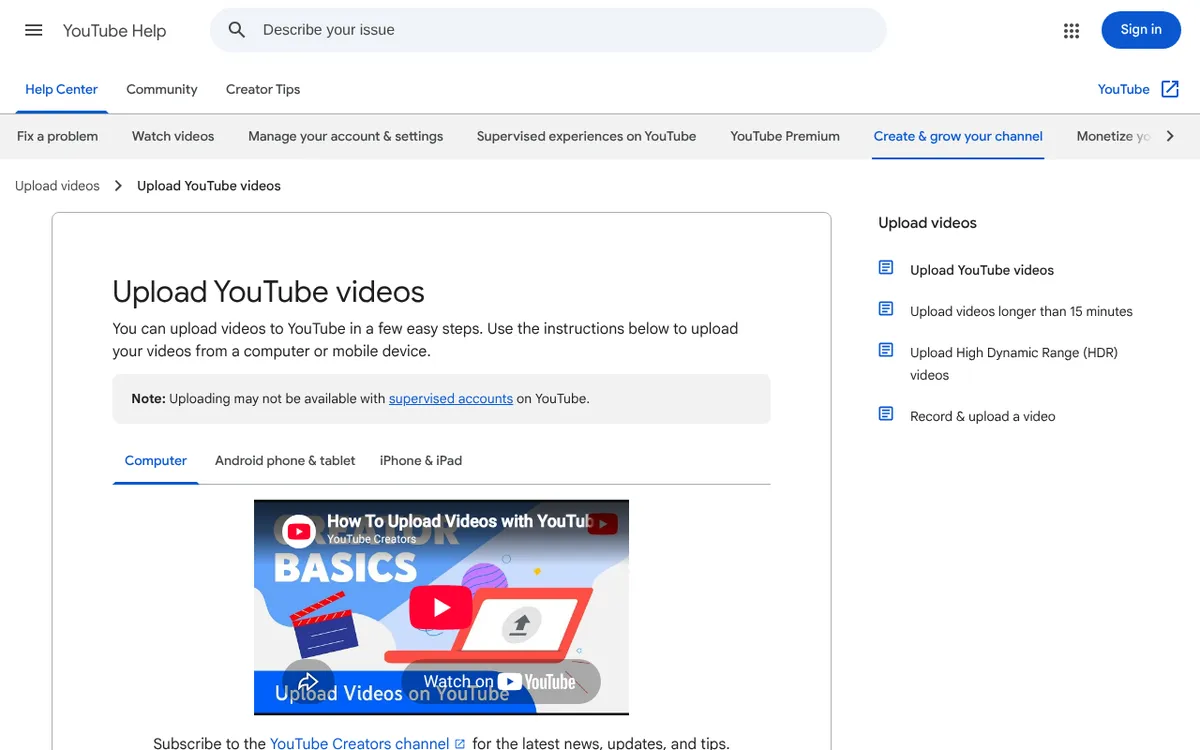
- Title: up to 100 characters. Put the words your viewer would type near the start.
- Description: up to 5,000 characters. Say in the first two lines what the video covers.
- Thumbnail: upload your own picture. Details are below.
- Audience: you must say whether the video is made for kids.
Close the window too early and your video is saved as private. Nothing is lost.
How do you add a custom thumbnail?
Open the video in YouTube Studio, find “Thumbnail”, and click “Upload file”. The thumbnail page recommends a 16:9 picture at least 640 pixels wide.
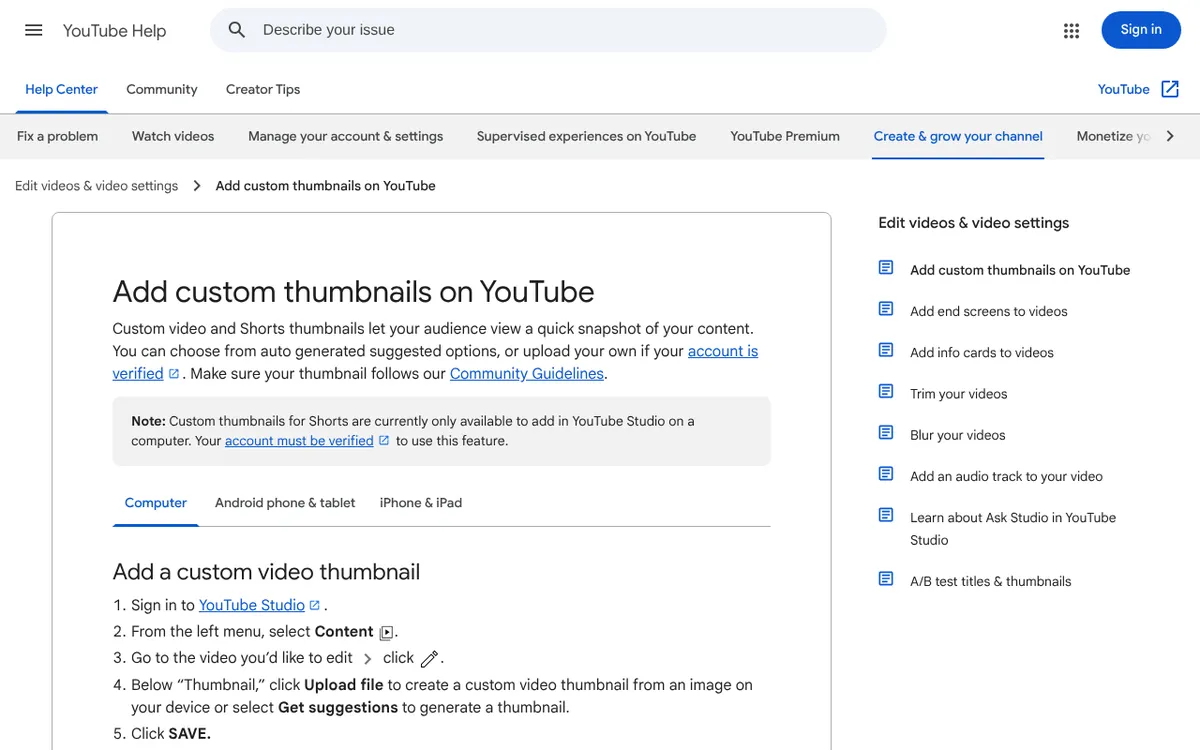
On a phone the file must stay under 2 MB. On a computer the limit is 50 MB.
Keep it simple: one face or object, one emotion, three or four words at most. Then check it at small size on a phone, because that is where most viewers will see it.
Do you have to tell YouTube about AI?
Only when AI content looks real. YouTube’s disclosure rules cover three main cases. A real person appears to say or do something they did not. A real event or place is altered. Or a realistic scene is shown that never happened.
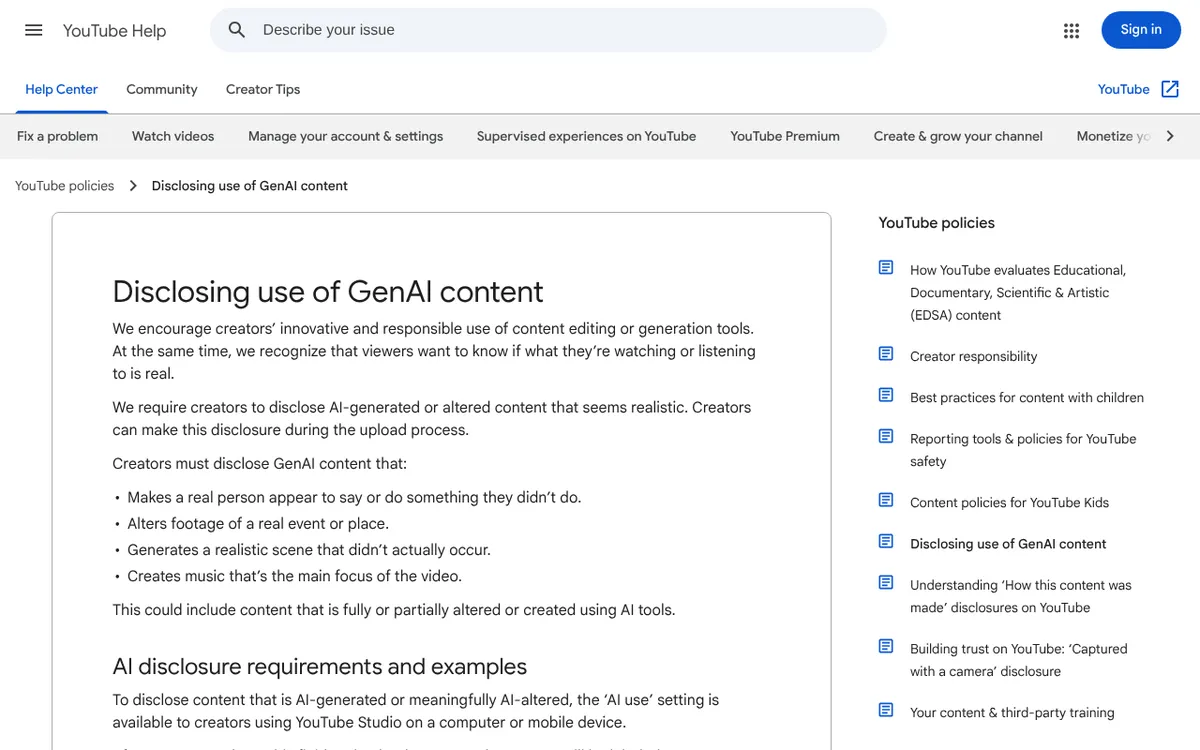
You tick “Yes” under “AI use” while uploading. Using AI for a script, a title, a thumbnail or captions does not need disclosure.
And the label does not hurt you. YouTube writes that disclosure alone “won’t limit a video’s audience or impact its eligibility to earn money”.
Mistake to avoid: a title or thumbnail that promises what the video does not deliver. Viewers leave, and the next step shows why that hurts.
Step 7. Grow your YouTube channel to the first 1,000 subscribers
Growth comes from viewers who click, keep watching and come back. Nothing else moves a channel for long.
YouTube has published how its recommendation system works. Its stated goal is to “maximize long-term viewer satisfaction”. It reads viewer signals: what people choose to watch, how long they stay, and what they skip.
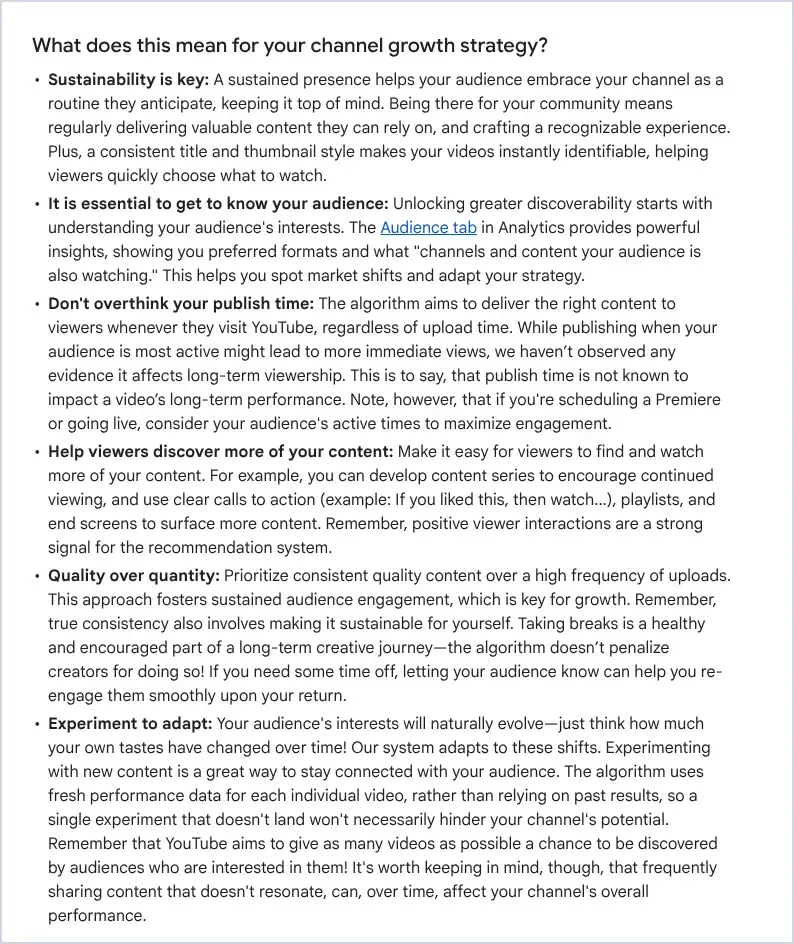
The algorithm does not like or dislike you. It follows your viewers. If they click, watch and come back, it shows your video to more people like them.
How to grow a YouTube channel without tricks
Work on three things, in this order.
- The click. YouTube says titles should “accurately reflect your video and get to the point quickly”. Write the title before you film.
- The first 30 seconds. Your retention report shows an “Intro” number: the share of viewers still watching after 30 seconds. Cut long greetings and start with the promise.
- The next video. End each video by pointing to one more. A viewer who watches two videos is closer to subscribing.
How good should your click rate be? YouTube’s impressions page says half of all channels and videos sit between 2% and 10%. Compare a video with your own average, not with other channels.
How often should you upload?
Less often than you fear. YouTube’s performance FAQ says “growth in views across uploads is not correlated with time between uploads”.
Its advice is short: “Sustainability is key.” One good video a week beats seven rushed ones. Pick a pace you can hold for a year.
Should a new channel make Shorts or long videos?
Both, with different jobs. Shorts reach new people fast. Long videos build trust and watch hours.
Since 15 October 2024, vertical or square videos up to three minutes count as Shorts. Remember one catch: Shorts watch time in the Shorts Feed does not count toward the 4,000 hours.
So here is my suggestion for most beginners. Make long videos your main product, and cut one Short from the best moment of each. Our guide to YouTube Shorts monetization in Pakistan covers the Shorts route in full.
What does the road from 0 to 100K look like?
Each stage of a channel has one main job. The picture below shows the four stages.
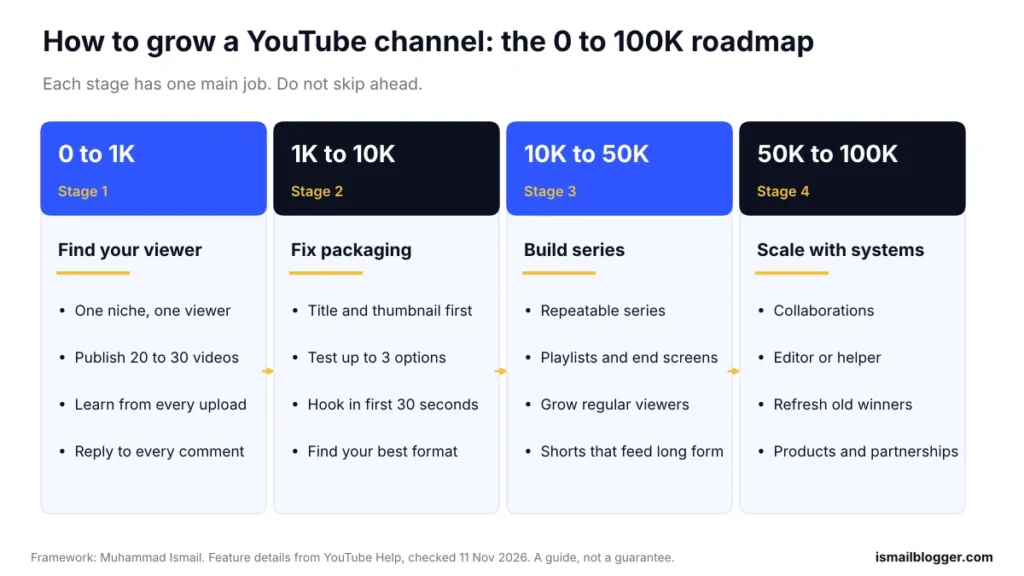
There is no fixed number of months for a stage. The stages tell you what to work on, not how fast it will happen.
In the table, find your stage and read across. The last column is the trap to avoid.
| Stage | Main job | What to watch in YouTube Studio | Common mistake |
|---|---|---|---|
| 0 to 1K subscribers | Find your viewer and your format | Which 2 or 3 videos got the most engaged views and the best Intro retention | Changing niche every week, judging a video after 2 hours |
| 1K to 10K | Fix packaging: titles, thumbnails, hooks | Impressions CTR and Intro retention on each new upload | Copying big channel thumbnails without the same promise inside |
| 10K to 50K | Turn winners into series so viewers return | Casual and regular viewers, playlist views, end screen clicks | One-off random topics that do not lead to a next video |
| 50K to 100K | Scale with systems, collaborations and a small team | Traffic sources, returning audience, revenue per video | Burning out by trying to do everything alone |
As a new channel, you are in row one. Ignore the other three for now.
Once you have a few uploads, check four numbers once a week, not every hour.
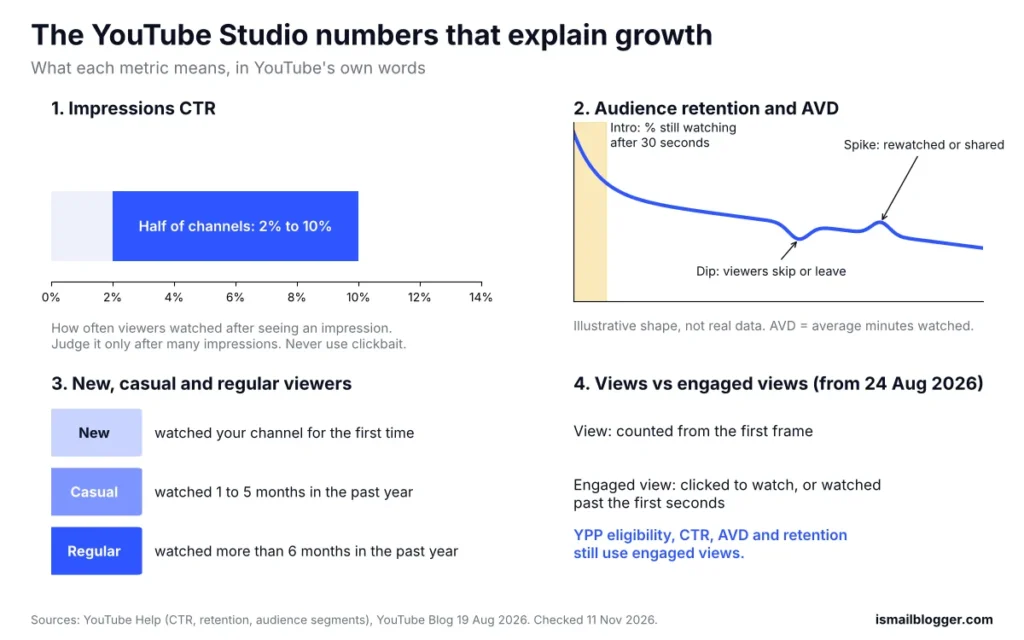
One 2026 change to know: since 24 August 2026 a public view counts from the first frame, the YouTube Blog explains. Judge your growth on “engaged views” in YouTube Analytics. The Partner Program still runs on those.
Mistake to avoid: sub4sub groups and “free subscriber” apps. They are covered in the mistakes section below.
Feeling overwhelmed? Three myths you can drop today
If seven steps feel like a lot, take a breath. You do not need all of it this week.
This week has one job: create the channel, verify your phone, and publish one video. The rest can wait.
And three common beliefs can go straight in the bin.
Myth 1: “I need a camera and a studio”
You do not. YouTube describes Shorts as made with “just a smartphone”. Standard features come with every new channel, free.
Myth 2: “I must upload every day”
YouTube says the opposite. Its recommendation page tells creators to “prioritize consistent quality content over a high frequency of uploads”. It adds that the algorithm “doesn’t penalize creators” for taking breaks.
Myth 3: “I need a USA channel to earn”
You do not. Pakistan is on YouTube’s own country list for the Partner Program. A Pakistani creator can apply from Pakistan, with a real Pakistani address.
Feel lighter? Good. Now the part everyone asks about: money.
Step 8. Meet the YouTube monetization requirements in Pakistan
To earn from ads, your channel must join the YouTube Partner Program, known as YPP.
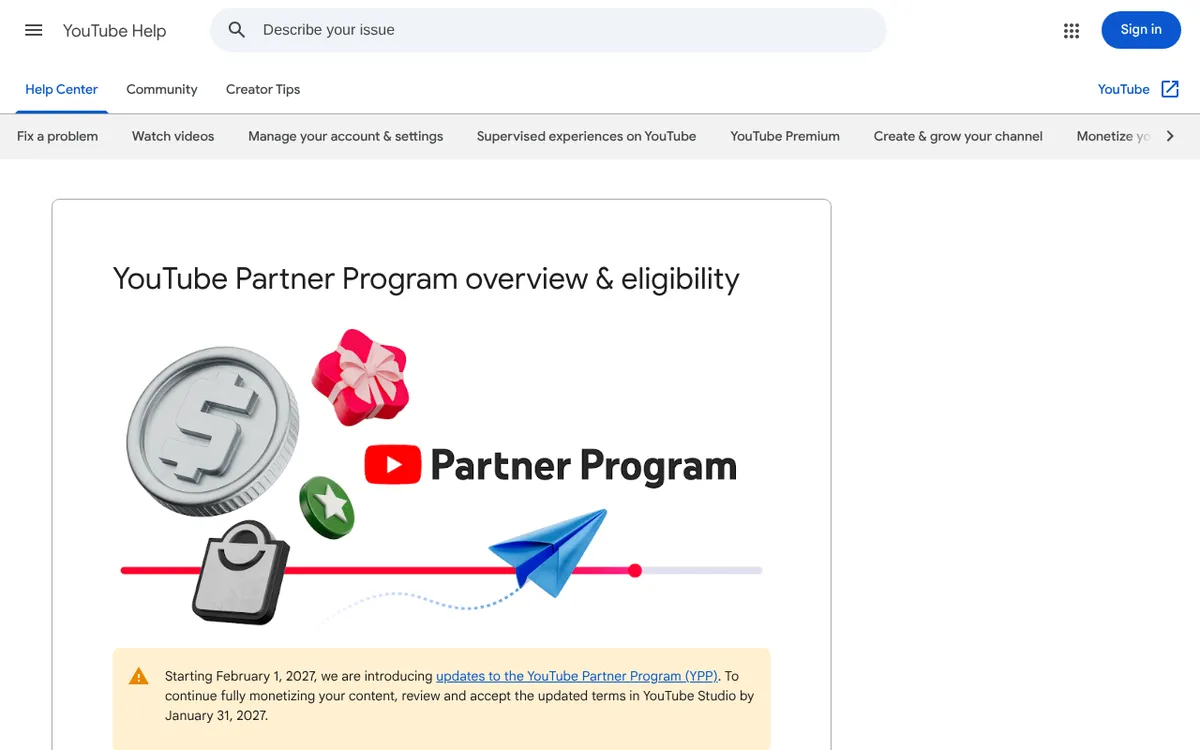
The YouTube Partner Program page lists what you need before the numbers:
- Follow the channel monetization policies.
- Live in a country where the program is available. Pakistan is.
- Have no active Community Guidelines strikes.
- Turn on 2-Step Verification.
- Have advanced features access.
- Link one AdSense for YouTube account, set up from inside YouTube Studio.
Then come the numbers. Compare the two columns: only one of them changes.
| Requirement | Until 31 January 2027 | New creators from 1 February 2027 |
|---|---|---|
| Subscribers | 1,000 | 1,000 |
| Long video route | 4,000 qualified watch hours in 12 months | 8,000 qualified watch hours in 365 days |
| Shorts route | 10 million qualified Shorts views in 90 days | 20 million qualified Shorts views in 90 days |
You need the subscribers plus one route, not both routes. Private, unlisted and deleted videos do not count.
Is the 500 subscriber tier open in Pakistan?
No. YouTube’s expanded program gives early access to fan funding at 500 subscribers, but only in listed countries. We read the list on 21 November 2026, and Pakistan is not on it.
So ignore videos that promise “monetization at 500 subscribers” here. For Pakistan, the number is 1,000.
How do you apply, and how long does review take?
Open YouTube Studio, click Earn, then “Apply Now”. You accept the terms and set up AdSense for YouTube in the same flow.
YouTube reviews the channel as a whole and replies “typically in about 1 month”. Rejected? You can appeal within 21 days, or apply again after 30 days.
The full process is in our YouTube monetization in Pakistan guide.
Which content will YouTube refuse to pay for?
Copied and mass produced content. On 15 July 2025, YouTube renamed its “repetitious content” rule to “inauthentic content”. Its monetization policies now say this covers content that is “repetitive or mass-produced”.
The reused content rule sits beside it. It covers channels that repost clips from elsewhere without adding real commentary or value.
Running a clips or compilation channel? Read how to fix reused content on YouTube before you apply. Planning a faceless channel with AI? Our YouTube automation in Pakistan guide shows the safe way.
Mistake to avoid: going silent after you get in. YouTube may turn off monetization on channels with no upload or post for 6 months.
Step 9. Get paid in Pakistan and handle the tax
YouTube pays you through AdSense for YouTube, once a month, by wire transfer to your bank.
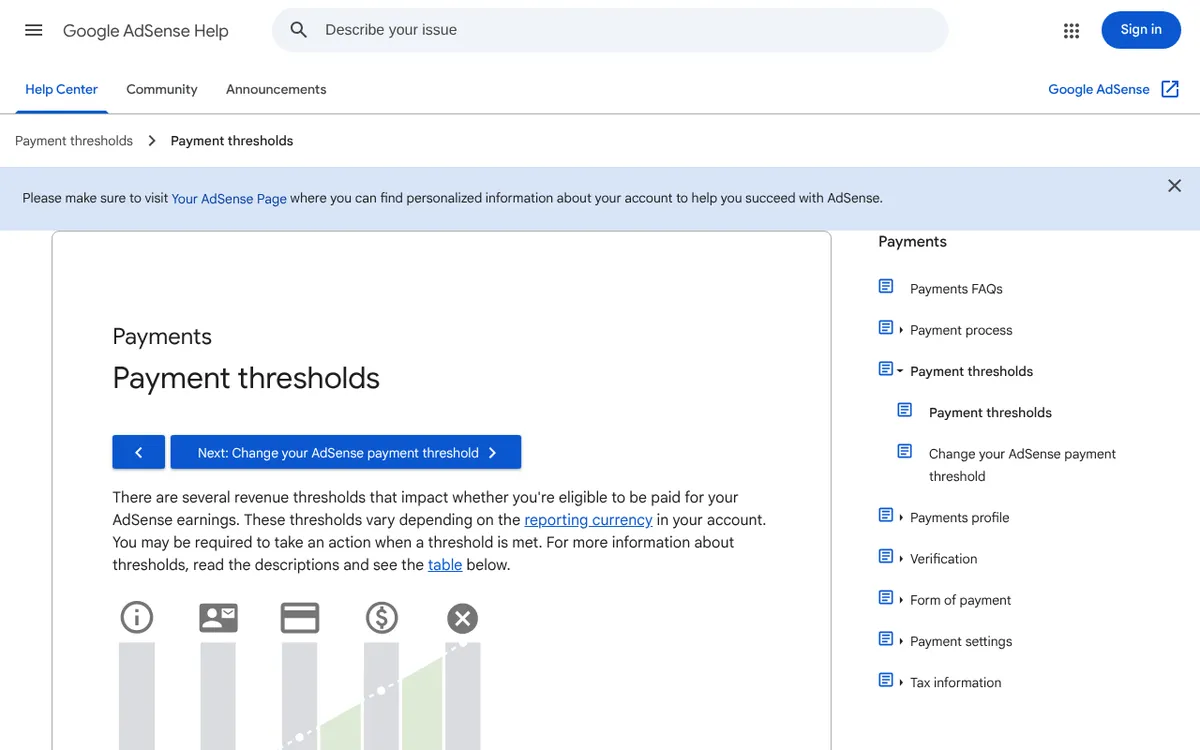
Three small gates stand between your first earnings and your bank. They come from Google’s payment thresholds page.
- At $10: Google posts a PIN to your home address. You enter it to verify the address.
- At $10: you can also choose your payment method. For Pakistan, Google’s table shows wire transfer and check. Choose wire.
- At $100: you get paid. Your balance must reach $100 by the 20th of the month.
Payments go out between the 21st and the 26th. A wire can then take up to 15 business days, YouTube’s payment guide says.
How many views does $100 take?
It depends on your RPM, the amount you earn per 1,000 views.
Here is one real number. On my own channel, YouTube Studio showed an RPM of about $1.32 in November 2026. That is one channel’s figure, not an average, and yours will differ.
As an example only: at $1.32, reaching $100 takes about 75,758 views. The sum is 100 divided by 1.32, times 1,000.
Try your own numbers in our free YouTube money calculator. It converts to rupees at the live rate.
Which tax form does YouTube ask for?
The US tax form, from every creator in the world. YouTube’s tax page says to submit it by 10 December each year.
Skip it, and Google may deduct up to 24% of your total earnings worldwide. Submit it, and the deduction is 0 to 30% of earnings from US viewers only.
Our walkthrough of the YouTube US tax form from Pakistan shows each screen.
What does Pakistan deduct?
Your bank deducts 5% when YouTube money lands in your account. This is section 154B of the Income Tax Ordinance, added by the Finance Act 2026.
Not on the Active Taxpayers List (ATL)? On our reading of the Tenth Schedule, the rate doubles to 10%. This is our understanding of the law, not tax advice.
Here is a labelled example. It uses FBR’s benchmark of Rs 195 per 1,000 monetized views, as reported by Arab News on 7 October 2026.
- 80,000 views in a month: 80 x Rs 195 = Rs 15,600.
- On the ATL, the bank deducts 5%: Rs 780. You receive Rs 14,820.
- Not on the ATL, it deducts 10%: Rs 1,560. You receive Rs 14,040.
So being on the ATL is worth Rs 780 in this example.
Run your own figures in the YouTube tax calculator. For returns and records, read our guide to YouTube income tax in Pakistan.
Mistake to avoid: opening a second AdSense account. Google allows one per payee name, and duplicates cause payment trouble.
Six mistakes that kill new channels
Most dead channels did not fail on talent. They broke a rule or quit too early.
- Sub4sub and bought subscribers. YouTube’s fake engagement policy names “sub4sub”. Artificial traffic is not counted and “can lead to strikes”.
- Collecting strikes. Three Community Guidelines strikes in the same 90 days can remove your channel for good.
- Buying a ready channel. YouTube does not allow the sale or transfer of handles. Reviewers also check how you made the content, so a bought channel can fail review.
- Reuploading other people’s videos. Permission does not save you. The reused content rule applies “even if you have permission from the original creator”.
- Faking your country. Google posts a PIN to your real address. A fake one means the PIN never arrives, and neither does the money.
- Quitting after five videos. No YouTube page promises results in a week or a month. Judge each upload against your last one, not against the calendar.
Avoid these six and you are already ahead of most beginners.
Frequently asked questions
How do I create a YouTube channel and earn money in Pakistan?
Create the channel free in YouTube Settings, verify your phone, and publish original videos. When you reach 1,000 subscribers and 4,000 watch hours in 12 months, apply to the YouTube Partner Program. AdSense then pays by wire transfer once your balance reaches $100.
YouTube channel kaise banaye mobile se?
Mobile browser mein YouTube par sign in karein, profile picture par tap karein, phir Settings kholein. Account section mein “Add or manage channel(s)” chunein aur “Create a channel” dabayein. Naam aur handle likhein, bas. Channel banana bilkul free hai.
Can I start a YouTube channel without investment?
Yes. Creating a channel, uploading videos and the Audio Library are all free. A phone and an internet connection are enough to begin. Spend on gear only after your videos start working.
What are the YouTube monetization requirements in Pakistan?
You need 1,000 subscribers plus 4,000 qualified watch hours in 12 months, or 10 million qualified Shorts views in 90 days. From 1 February 2027, new creators need 8,000 hours or 20 million Shorts views. The 500 subscriber tier is not open to Pakistan.
How to create a USA YouTube channel in Pakistan?
You should not fake your country, and you do not need to. Pakistan is on YouTube’s Partner Program country list. AdSense verifies your address with a posted PIN, and your tax withholding depends on your real country of residence.
How much does YouTube pay per 1,000 views in Pakistan?
There is no fixed rate. It depends on your topic, your viewers’ countries and the ads shown. For tax, FBR uses a benchmark of Rs 195 per 1,000 monetized views. Test your own RPM in our YouTube money calculator.
How long does it take to grow a YouTube channel?
There is no fixed timeline. None of the YouTube pages cited here gives one. It depends on your niche, your titles and thumbnails, and how many videos you have made.
Your next step
You now have the full road: one viewer, a free channel, a verified phone, a first video, and the rules for getting paid.
Do not try to do it all tonight. Create the channel and verify your number today. Film your first video this weekend.
YouTube is one of several real ways to earn from home. See where it fits in our guide to online earning in Pakistan.
Keep reading
Related articles
 YouTube & AI · 23 min readYouTube Automation with AI Using Claude: A Workflow That Stays Inside YouTube’s RulesRead article →
 YouTube & AI · 12 min readChatGPT in Urdu: How to Use It, With 20 Ready Prompts (2026)Read article →
 YouTube & AI · 12 min readGoogle AdSense Payment in Pakistan: Methods, Dates and Tax (2026)Read article →
 YouTube & AI · 17 min readYouTube Monetization in Pakistan: Full YPP Guide for 2026 and 2027Read article →
 Tax · 17 min readYouTube Income Tax in Pakistan (2026-27): Rates, Rules and How to FileRead article →
 YouTube & AI · 17 min readYouTube Shorts Monetization in Pakistan: Requirements, 2027 Changes and PaymentsRead article →