Short answer: To fix reused content on YouTube, find the videos where a reviewer cannot see your own work, then remake or remove them, publish new videos with your own commentary, analysis and editing, and reapply when your waiting period ends. After a first rejection you can appeal within 21 days or reapply after 30 days. After a second rejection the wait is 90 days.
I am Muhammad Ismail. I have been creating online since 2010 and my YouTube channel has 377K subscribers. Rejected creators ask me the same thing at workshops: “My videos have no copyright claim, so why reused content?” This guide answers that using what YouTube itself says. I read every YouTube Help page linked here on 10 November 2026. For the full faceless channel workflow, tools and payouts, read my YouTube automation in Pakistan guide. This article goes deeper on one problem: diagnosis and repair after a rejection.
Key takeaways
- Reused content is not a copyright decision. YouTube says the policy applies even if you have permission from the original creator, and even when you have no claims.
- The policy is applied to your channel as a whole. A few good videos cannot cover a channel where most watch time comes from copied or lightly edited material.
- Decide first: appeal or repair. For an appeal, YouTube reviews the channel in its current state and tells you not to delete videos first. For a reapplication, you edit or delete the problem videos.
- Timings from YouTube Help: appeal within 21 days, reapply 30 days after a first rejection, 90 days after a later one. A review takes about a month.
- AI voice and AI visuals are allowed when the script, idea and structure are yours. Templated, mass produced AI videos are not.
- From 1 February 2027 the entry thresholds for new creators rise to 8,000 watch hours or 20 million Shorts views, so a slow repair now costs more than before.
What does “reused content” mean in a YouTube rejection?
YouTube defines it on its channel monetization policies page as channels that repurpose content already on YouTube or another online source “without adding significant original commentary, substantive modifications, or educational or entertainment value”. It also calls this duplicative or scraped content.
Three lines on that page explain most confusion:
- “Our reused content policy applies to your channel as a whole.”
- “If we cannot tell that the content is yours, it may be subject to our reused content policy.”
- “This policy applies even if you have permission from the original creator.” YouTube adds that reused content is separate from copyright enforcement and is not based on copyright, permission or fair use.
So a licence, a stock subscription, a “no copyright” music pack or zero Content ID claims do not answer the question. The question is simple: what did you add, and can a viewer and a reviewer see it?
What YouTube’s channel monetization policies say today
Your rejection email names a policy. Read the name carefully, because the fix is different for each. As of 10 November 2026, the policy page has four content sections. A note on the same page says that on 15 July 2025 YouTube renamed “repetitious content” to “inauthentic content” to make clear it covers repetitive or mass produced videos, and that the reused content policy did not change. Many emails and older guides still use those words.
| Policy section today | What it targets | YouTube’s examples that can monetize | YouTube’s examples that cannot |
|---|---|---|---|
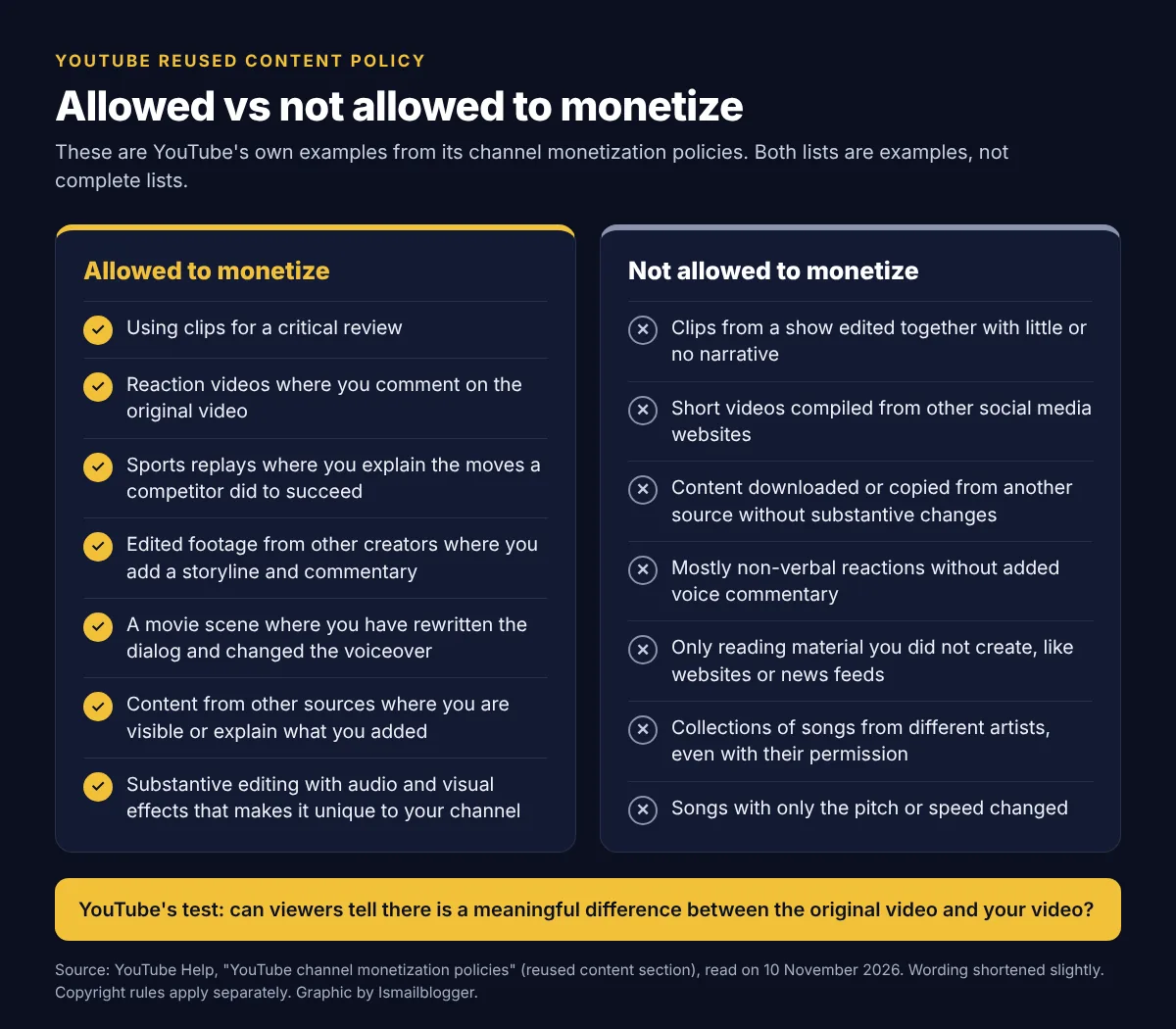
| Reused content | Other people’s material with too little of your own work added | Clips used for a critical review. Reaction videos where you comment on the original. Sports replays where you explain the moves. Edited footage from other creators where you add a storyline and commentary | Clips from a show edited together with little or no narrative. Short videos compiled from other social media websites. Content uploaded many times by other creators. Only reading text you did not create, such as websites or news feeds |
| Generic or repetitive content | Videos that look made from a template, or feel repetitive after watching several in a row | The same intro and outro when the bulk of each video is different. A series or review channel where each video has a distinct storyline, focus or concept | Image slideshows or scrolling text with minimal or no narrative, commentary or educational value. A highly similar storyline template across many videos. AI content made with generic templates that gives the impression of mass production |
| Unsatisfying or off-putting content | Emotionally manipulative formulas, copied formats that feel interchangeable, shock made only for views | A cohesive storyline that does not rely only on shock value. Using AI to visualize a unique character and narrative you invented. Using AI to edit your scripts or generate a unique background visual | Unrelated or inconsistent AI clips stitched together to surprise viewers. Repetitive scenes of animals in exaggerated distress. Realistic visuals that trick viewers into believing a fake celebrity death or disaster |
| AI personas related to sensitive topics | An AI generated persona presented as a human expert on health, legal issues, finances or politics | YouTube lists no allowed examples in this section | An AI “doctor” giving health advice. AI generated podcast hosts offering financial guidance or investment tips. AI personas giving legal advice |
The examples in the table are YouTube’s own, shortened slightly. YouTube says none of its lists are complete. The page also covers Community Guidelines, quality rules for kids content, creator responsibility and creator integrity, which can block an application for other reasons.
What do YouTube reviewers actually look at?
The YouTube Partner Program overview says automated systems and human reviewers review your channel as a whole. They cannot watch everything, so the policy page lists where they may focus:
- Your channel’s main theme
- Your most viewed videos
- Your newest videos
- The videos with the biggest proportion of watch time
- Video metadata: titles, thumbnails and descriptions
- Your channel’s “About” section
For reused content, YouTube says reviewers check your videos, channel description, video titles and video descriptions “to understand how you created, participated in, or produced your content”. YouTube also says reviewers can check other parts of the channel.
This tells you where to work. If your five most viewed videos are compilations, ten new original uploads with few views will not change what a reviewer sees first.
Appeal or fix and reapply: decide before you delete anything
These are two different routes with opposite instructions. YouTube’s appeal page says: “your channel will be assessed in its current state. This means you shouldn’t delete videos before submitting your appeal.” Its rejection FAQ says that before you reapply you should “edit or delete any videos that violate our policies”.
- Appeal if the email describes a channel you do not recognise. You write, voice and edit everything yourself, and you can show the process.
- Repair and reapply if you can honestly see what the reviewer saw: clips, compilations, readings of other people’s text, or one template repeated.
| Situation | What YouTube says | Where it says it |
|---|---|---|
| Review of an application | A decision typically in about 1 month. Delays are possible, and some channels need more than one review | YPP overview |
| Appeal a rejected application | Within 21 days, regardless of the number of application attempts | Rejection FAQ |
| Appeal decision | A response within 14 days. If the appeal succeeds, approval within 30 days | Appeal page |
| Reapply after a first rejection | 30 days after you get the rejection email | Rejection FAQ |
| Reapply when it is not your first rejection, or you have reapplied before | 90 days after you get the rejection email | Rejection FAQ |
| Reapply after a rejected appeal | 90 days after your application rejection date | Appeal page |
| Already monetized, then suspended | Appeal within 21 days, or reapply 90 days after suspension. If you get a “scheduled for suspension” notice, you have 7 days to appeal first | Monetization is disabled for my channel |
The exact date for your channel is shown in YouTube Studio under Earn. Trust that date over any blog, including this one. Note what the table means for a first rejection: a failed appeal can turn a 30 day wait into a 90 day wait, so appeal only when you have a real case.
If you appeal by video
The appeal page sets the format: a new, unlisted video of less than 5 minutes, uploaded to the channel you are appealing, with your channel URL in the first 30 seconds and no appeal text in the description. Talk about the channel as a whole, refer to the specific policy, and show how you film or edit. Some channels are offered an appeal through Creator Support in Studio instead.
How to fix reused content, step by step
Step 1: Read the email and name the exact policy
Open the rejection email and the Earn section in Studio. Write down the policy named. “Reused content” means borrowed material is the problem. “Repetitive”, “inauthentic” or “generic” means your own videos look like copies of each other. Some channels have both problems, and then you need both fixes.
Step 2: Audit the channel in the order reviewers look
Make a simple sheet with one row per video. In YouTube Analytics, sort by views and then by watch time for the last 365 days. Start with the top 20 by watch time, then the 10 newest uploads, then the rest. For each video, fill these columns:
- Where the visuals came from: filmed by me, screen recorded by me, made by me in an editor or AI tool, stock, or someone else’s video
- Where the words came from: written by me, rewritten from one source, or read directly from a source
- What I added: commentary, analysis, comparison, a story, teaching, or nothing
- Whether the title, thumbnail and structure match five other videos on the channel
Then run one test. Mentally remove everything you did not create. If almost nothing is left, mark the video red.
Step 3: Sort every video: keep, remake, unlist or delete
| What the audit shows | Action | Why |
|---|---|---|
| Your own script, voice or visible input, clear structure, different from your other videos | Keep | This is what reviewers need to see more of |
| A good topic with real views, but your contribution is thin | Remake, or edit the original if only a small part is the problem | A remake keeps the topic and replaces the weak proof of your work |
| Unedited or lightly edited copies, compilations from TikTok, Instagram or Facebook, re-uploads | Delete | These match YouTube’s “not allowed” examples and cannot be repaired by a new intro |
| Readings of news sites, Wikipedia or other people’s articles with no analysis | Delete or remake with your own script | YouTube lists content that exclusively features readings of materials you did not create |
| You plan to remake it soon but are not ready | Unlist for now, then replace | It takes the video out of public view while you work |
Three warnings before you start deleting:
- Watch hours go with the video. The YPP overview says watch hours from private, unlisted and deleted videos do not count toward the threshold. Check your numbers in the Earn tab after the cleanup. You may need new hours before you can apply again.
- Unlisting is parking, not a fix. YouTube’s instruction is to edit or delete. I could not find any YouTube statement that reviewers ignore unlisted or private videos, so do not build your plan on hiding things.
- Deleting does not clear strikes. YouTube says on its monetization disabled page that deleting a video will not fix Community Guidelines or copyright issues. Those have their own appeal and resolution process.
Step 4: Add real original value to what you keep and remake
A logo, a border, a filter, mirrored footage, background music or a changed speed is not a substantive change. YouTube’s allowed examples all have one thing in common: the creator’s own thinking is in the video. Build that in five ways.
A logo, a filter or background music is not enough: your own thinking has to be visible in the video.
- Commentary: say what you think and why. Agree, disagree, rank, warn. A clip should be evidence for your point, not the video itself.
- Analysis: explain how or why something happened. YouTube’s own example is a sports replay where you explain the moves a competitor did to succeed.
- Voice: your own voice is the clearest signal. If you use an AI voice, the script must be yours. YouTube lists non-verbal reactions without voice commentary as not allowed.
- Editing: edit to serve your script: cut, zoom, label, compare, add your own graphics and screen recordings. YouTube allows edited footage with effects that “demonstrates substantive editing and shows it’s unique to your channel”.
- Structure: give each video its own question, order and conclusion. If two videos could swap titles and nobody would notice, change the format.
A hypothetical example: a channel uploads “Top 10 cricket catches” as ten broadcast clips with music. The remake picks four catches, and the creator explains the fielder’s starting position, the footwork and the mistake the batter made, with freeze frames and arrows, in his own voice. Same topic, but now the clips support his analysis. Copyright still applies separately, so shorter clips and your own graphics are safer.
Research helps you find an angle nobody has covered. I built TubeMind, my own YouTube research tool, to find breakout videos and study niches. Use it or any similar tool to see what is missing in a topic, not to copy what is working. No tool can make a copied video original.
Step 5: Fix the titles, descriptions and About section
Reviewers read metadata to understand how you made the content. Write an About section that says who runs the channel and how videos are made, for example that you research, script and edit them yourself. In descriptions, add one or two honest lines about your sources and what you added. Remove copy pasted titles and identical thumbnails that make the channel look mass produced.
Step 6: Publish in the new format, then reapply
YouTube tells rejected creators to “keep uploading original content”. Use the waiting period for that. I suggest waiting until your new format videos are among your newest uploads and are earning a real share of your watch time, because those are the areas reviewers focus on. That is my reading of the review focus list, not a number YouTube gives. Then check that you still meet the threshold and apply from the Earn tab.
Self audit checklist before you reapply
- I have read the rejection email and I know which policy was named.
- My top 20 videos by watch time all pass the “remove what I did not make” test.
- My 10 newest videos are in the new format.
- Every video has my own script and my own commentary or teaching in it.
- No video is only a reading of a website, news feed or someone else’s article.
- No video is a compilation from other social media platforms.
- Watching five of my videos in a row does not feel like the same video five times.
- My About section and descriptions explain how I make the content.
- Realistic AI generated or altered content is disclosed.
- I have no active Community Guidelines strikes, and 2-Step Verification is on.
- After the cleanup, the Earn tab still shows that I meet the threshold.
- My reapply date in Studio has arrived.
How AI voice and AI visuals fit the policy
YouTube does not ban AI tools. Its policy page lists these as examples that can monetize: “using AI to visualize a unique character and narrative you invented” and “using AI to edit your video scripts or generate a unique background visual for your content”. What it rejects is “AI-generated content made with generic or unoriginal templates giving the impression of mass production without adding the creator’s original, authentic insights or perspective”.
So an AI voice reading your own researched script over visuals you chose for that script can pass. The same AI voice reading scraped text over the same stock loops every day fails twice: once as reused content and once as generic or repetitive content.
The disclosure rule for altered or synthetic content
This is a separate rule from monetization. YouTube’s page on disclosing GenAI content requires disclosure, through the “AI use” setting in Studio, when realistic content:
- Makes a real person appear to say or do something they did not do
- Alters footage of a real event or place
- Generates a realistic scene that did not actually occur
- Creates music that is the main focus of the video
You do not need to disclose production help such as AI generated outlines, scripts, thumbnails, titles or captions, clearly unrealistic or animated content, or cloning your own voice for voiceovers. YouTube states that disclosure alone will not limit a video’s audience or its eligibility to earn. It also says creators who consistently choose not to disclose may face penalties, including suspension from the YouTube Partner Program. When you are unsure, disclose.
Mistakes that cause a second rejection
- Reapplying on day 31 with the same videos. A second rejection moves you to a 90 day wait.
- Cosmetic changes. New intros, borders, filters, flipped video or changed pitch and speed. YouTube lists songs with only pitch or speed changed as not allowed.
- Swapping the voice only. Replacing a human reading of someone else’s text with an AI reading, or the reverse, changes nothing.
- Fixing only the newest uploads. Most viewed videos and biggest watch time sources are on the review list.
- Deleting videos and then appealing. Appeals are judged on the channel in its current state.
- Relying on permission. A written permission or licence does not change a reused content decision.
- Growing on copied videos, then deleting them before applying. YouTube’s creator integrity policy says creators should not encourage organic engagement on non-compliant content before deleting or hiding it.
- Ignoring the second problem. You fix the clips but every new video uses one template, so the next email says repetitive content.
What this means for Pakistani faceless channels
Faceless is fine. YouTube does not require a face, and its allowed examples include content where the creator “explains how the creator added to the content”. But the formats many beginners here are taught are exactly the ones on the “not allowed” list: drama and talk show clips, cricket highlight compilations, TikTok compilations, and AI voices reading news sites. Channels built on those formats should expect a rejection.
- Urdu is not on the appeal language list. The appeal page asks for narration in a supported language or English subtitles that are not auto-generated. The listed languages are Arabic, Bengali, English, French, Hindi, Indonesian, Japanese, Korean, Mandarin, Portuguese, Russian, Spanish, Thai, Turkish and Vietnamese. If you appeal by video, narrate in English or add your own English subtitles.
- Finance and crypto channels with an AI host are at risk. An AI persona presented as a human expert giving financial guidance or investment tips is not allowed to monetize. If you teach trading or money topics, be the real person behind the advice.
- The entry bar rises on 1 February 2027. YouTube’s YPP changes page says thresholds for new creators change to 8,000 qualified watch hours in the last 365 days or 20 million qualified Shorts views in the last 90 days, with 1,000 subscribers. A 90 day wait that starts now ends after that date. The page does not say how a reapplication after a rejection is treated, and I could not confirm it, so check the requirement shown in your Earn tab.
- Be careful with paid “reused content fix” services. Nobody outside YouTube can approve your channel, and YouTube itself says it cannot promise monetization after you fix things. Never share your Google login, and do not buy a “monetized channel” as a shortcut. If someone has taken your money, see my scam alert page.
If editing is your weak point, learn it or hire help. Video editing is also one of the skills I recommend in my freelancing in Pakistan guide. For step by step creator workflows, see my playbooks and the tools page. YouTube is one path among several in my online earning in Pakistan guide, so do not let one rejection decide your whole plan.
Reused content on YouTube: FAQ
Do Shorts follow the same reused content rules?
Yes. The policy page says that “video” means Shorts, long-form videos and live streaming. The Shorts monetization policies also say views on non-original Shorts, such as unedited clips from movies or TV shows, re-uploads of other creators’ content, or compilations with no original content added, are not counted for payment. I explain how Shorts views are paid in my guide to YouTube Shorts monetization in Pakistan.
Is stock footage counted as reused content?
YouTube’s policy page does not name stock footage. The test it gives is whether you added significant original commentary, substantive modifications, or educational or entertainment value. Stock clips under your own script and teaching are a different thing from stock clips under scraped text. If stock visuals and structure are identical in every video, the generic or repetitive policy becomes the risk.
Can I move my videos to a new channel and apply there?
Uploading the same videos to a new channel carries the same problem to the new channel. For channels that were demonetized or terminated, YouTube’s creator responsibility policy goes further: you should not create or use other channels to get around the restriction, and doing so could lead to termination of all your channels. Fix the content instead.
Will YouTube tell me which videos caused the rejection?
The rejection email tells you the specific policies your channel violated, according to YouTube’s FAQ. It does not promise a list of videos, which is why the audit in this guide matters. If you are stuck on a specific case, you can ask me here.
A reused content rejection is a message about proof: the reviewer could not see your work in the channel. Put your own thinking, voice and editing where reviewers look first, respect the waiting dates in Studio, and apply again when the channel honestly passes your own audit. This guide is education only, not legal or financial advice, and YouTube can change these rules, so confirm the current wording on YouTube Help before you act.
Keep reading
Related articles
 YouTube & AI · 15 min readYouTube Shorts Monetization in Pakistan: Requirements, 2027 Changes and PaymentsRead article →
 YouTube & AI · 17 min readYouTube US Tax Form From Pakistan: How to Fill It and What Gets DeductedRead article →
 YouTube & AI · 27 min readYouTube Automation in Pakistan: How to Build a Faceless Channel with AI in 2026Read article →