Short answer: YouTube automation with AI works when an assistant like Claude does the slow desk work (research notes, outlines, script drafts, title options, descriptions and Shorts ideas) and you do the parts YouTube actually pays for: choosing the angle, checking every fact and adding your own voice. YouTube allows AI help with scripts, but it will not monetize channels that look mass produced, so the human steps in this workflow are not optional.
Key takeaways
- YouTube does not ban AI written scripts. Its monetization policy lists “using AI to edit your video scripts” among allowed examples, but it refuses to monetize AI content that looks mass produced and carries no original insight from the creator.
- You do not need to tick the AI disclosure box just because Claude helped with an outline, script, title, thumbnail or ideas. YouTube calls that “production assistance”. Realistic AI video, altered real footage, AI music and fake statements by real people must be disclosed.
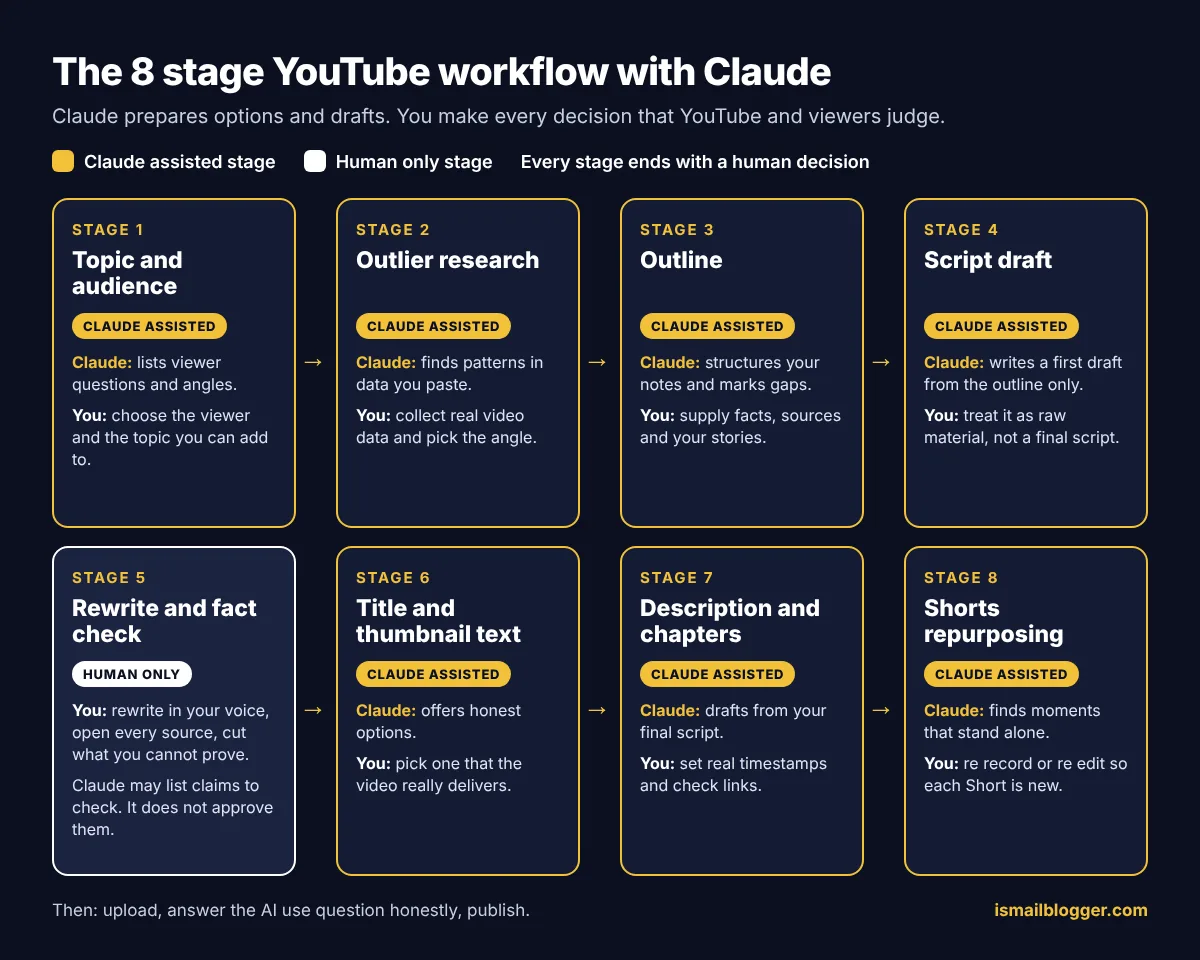
- Use Claude in 8 stages: topic, outlier research, outline, script draft, human rewrite and fact check, title and thumbnail text, description and chapters, Shorts.
- Every prompt in this guide tells Claude to use only your notes, to mark missing facts instead of inventing them, and to leave space for your own stories.
- Never let Claude invent facts, quotes or statistics, and never paste in another creator’s script to “rewrite”.
- You can start on the Free Claude plan, which includes Sonnet, Haiku and up to 5 Projects. Opus needs Pro or higher. Prices are in US dollars and can change, so check the pricing page before you pay.
On this page
- Can Claude really automate a YouTube channel?
- What are YouTube’s rules for AI assisted videos?
- YouTube automation with AI: the 8 stage Claude workflow with copyable prompts
- Task by task: how Claude helps and what you must still do
- What should you not use Claude for?
- Which Claude plan do you need, and what does it cost?
- Human in the loop checklist before you publish
- Claude for YouTube: FAQ
This website was redesigned with Claude (it is listed on my Resources page), and my free AI with Claude Playbook covers that setup. Below is the workflow I recommend to creators in Pakistan, with prompts you can copy. I reread the YouTube Help pages and the Claude pricing page on 12 November 2026 and quote them, so you can check each point.
Can Claude really automate a YouTube channel?
Partly. Claude is a writing and thinking assistant. It is good at turning messy notes into a clear outline, drafting a first version of a script, giving you twenty title options in a minute, and cutting a long script into short ideas.
It is not a camera, a voice, an editor or a fact checker, and it does not know your audience the way you do. Many guides show a full “pipeline” where AI picks the topic, writes the script, makes the voice and uploads the video with no human in between. That is the kind of channel YouTube describes when it lists what it will not pay for.
In this guide, automation means something modest: Claude removes the repetitive writing work, and you stay in charge of every decision a viewer or a YouTube reviewer will judge.
What are YouTube’s rules for AI assisted videos?
Two official pages decide this: the monetization policies and the disclosure page. I summarise them below as they read on 12 November 2026.
Is an AI written script monetizable?
The monetization policies page says that if you are making money on YouTube, your content should be original and “authentic”. It expects your content to be your original creation, and to “not be mass-produced, generic, repetitive, or manipulative”.
The page does not say that AI help is forbidden. Under what is allowed, it gives this example: “using AI to edit your video scripts or generate a unique background visual for your content”. It also says: “If you use automated tools or templates to help create your content, the final product must still demonstrate your creative vision and provide educational or entertainment value.”
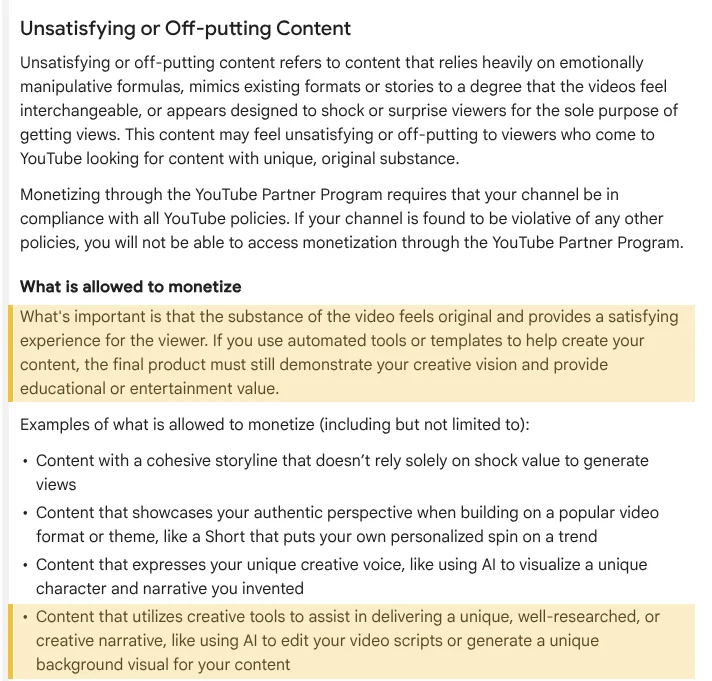
The page groups the problems into four sections that matter for AI channels: generic or repetitive content, reused content, unsatisfying or off-putting content, and AI personas on sensitive topics. On repetition it says “the substance of each video should be materially varied”. These are the lines every Claude user should remember:
- “AI-generated content made with generic or unoriginal templates giving the impression of mass production without adding the creator’s original, authentic insights or perspective.”
- “Image slideshows, templated storylines, or scrolling text with minimal or no narrative, commentary, or educational value.”
- Under reused content: “Content that exclusively features readings of other materials you did not originally create, like text from websites or news feeds.”
- Channels “where content feels interchangeable from video to video”.
- Under unsatisfying content: videos “that stitch together unrelated or inconsistent AI clips to surprise or shock viewers”, and “realistic visuals tricking viewers into believing a fake celebrity death or natural disaster has occurred”.
YouTube added a note on 15 July 2025 saying it was clarifying that its repetitious content policy includes repetitive or mass produced content, and renaming it “inauthentic content”. The note also says this type of content was always ineligible. So the rule is not new, only clearer. If your channel has already been rejected for reused content, my guide on how to fix reused content on YouTube walks through the review and the appeal.
My reading: a script that started in Claude can be monetized if the finished video has your angle, your examples and facts you checked. The same script, published as it came out of the chat on a channel where every video follows one template, fits the “not allowed” list. No tool and no prompt can guarantee approval, because reviewers look at the whole channel: its main theme, most viewed videos, newest videos, the videos with the biggest share of watch time, titles, thumbnails, descriptions and the About section.
A warning for finance, health and legal channels
The monetization page has a section called “AI Personas Related to Sensitive Topics”. It covers channels that use AI generated personas presented as human experts giving advice on “health, legal issues, finances, or politics”, and says those channels “will not be allowed to monetize”. Its examples include an AI “doctor” giving health advice and AI generated hosts “offering financial guidance, investment tips, or wealth management advice”.
If you make finance content, be a real, named person, show your sources, and do not hide behind an AI avatar that pretends to be an expert.
Do you have to disclose that you used Claude?
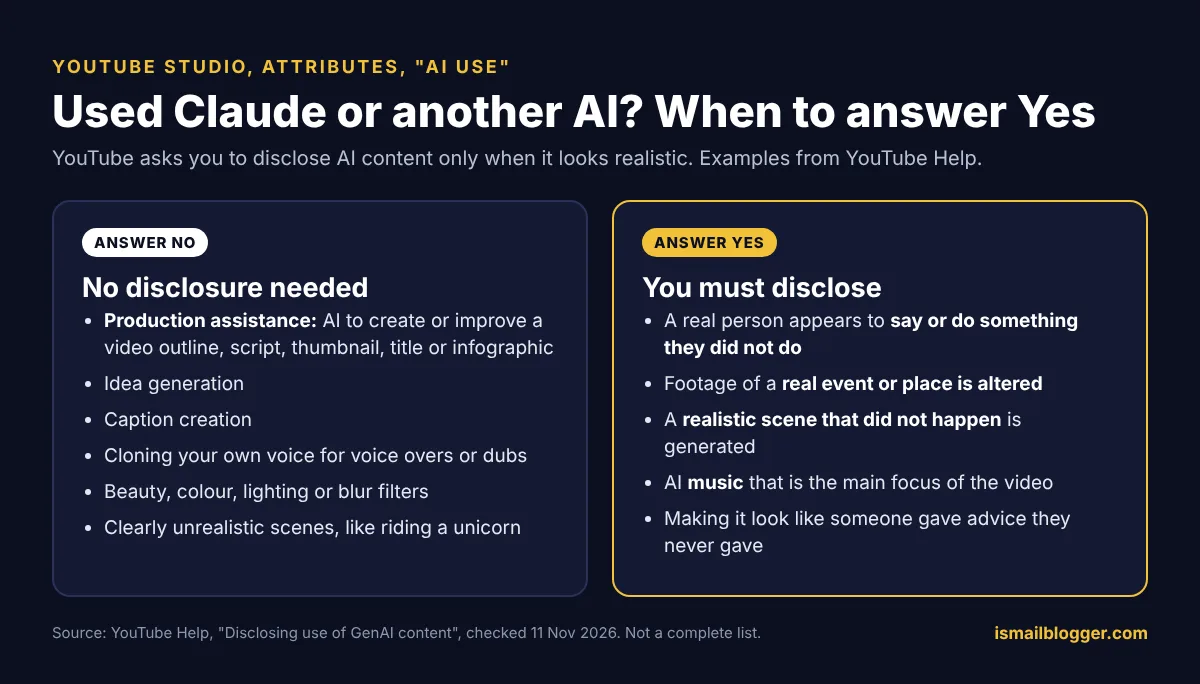
For scripts, no. The disclosure page lists things creators do not need to disclose, and one of them is: “Production assistance, like using generative AI tools to create or improve a video outline, script, thumbnail, title, or infographic”. The same list includes “Idea generation”, “Caption creation” and “Cloning one’s own voice to create voice overs or dubs”.
You must disclose AI content that seems realistic. YouTube names four cases: content that makes a real person appear to say or do something they did not do, content that alters footage of a real event or place, a realistic scene that did not actually occur, and AI music that is the main focus of the video. You answer this in YouTube Studio during upload, in the Attributes section under “AI use”.
Two more lines from that page matter. “Disclosing AI content alone won’t limit a video’s audience or impact its eligibility to earn money.” So there is no reason to hide it. And creators who consistently choose not to disclose may face penalties, “including removal of content or suspension from the YouTube Partner Program”.
YouTube may also add a label by itself, for content made with YouTube’s own GenAI tools, content that carries C2PA metadata, and content its internal systems detect as AI generated or altered. You get a notification in Studio when that happens, and in most cases you can correct a wrong label by selecting No.
Disclosure and monetization are separate tests. Ticking the box does not make a mass produced channel eligible, and not needing the box does not mean the script is good enough.
YouTube automation with AI: the 8 stage Claude workflow with copyable prompts
Each stage has a prompt you can paste into Claude. Replace the parts in [SQUARE BRACKETS] and adjust the wording to your niche. Keep all stages inside one Claude Project, set up as shown below, so Claude remembers your channel and viewer.
Before stage 1: set up one Claude Project for your channel
Claude’s Projects are workspaces with their own chat history, your own instructions and uploaded files. Anthropic’s help page says they are available on every plan, with free accounts limited to five. One Project per channel saves you from pasting the same background into every chat. Paste this into the Project instructions and fill in the brackets:
You are my research and writing assistant for the YouTube channel [CHANNEL NAME].

About the channel: [NICHE, LANGUAGE, TYPICAL VIDEO LENGTH]
Viewer: [WHO THEY ARE, WHAT THEY ALREADY KNOW, WHAT THEY STRUGGLE WITH]
My voice: [3 TO 5 WORDS, e.g. calm, direct, practical, no hype]
Things I never do: income promises, fake urgency, medical or investment advice, copying other creators.

Standing rules for every chat in this Project:
1. Use only facts from my notes or the files in this Project. If something is missing, write [NEED SOURCE].
2. Never invent statistics, quotes, people, results or examples.
3. Leave [MY STORY] gaps where my own experience belongs. Do not write my stories for me.
4. Say when you are unsure. Do not confirm facts from memory.
5. Keep my wording simple. Short sentences.
Then upload two or three files to the Project knowledge: a short channel brief, a list of your best performing videos with one line on why they worked, and a page of your own past scripts so Claude can see how you really talk.
Stage 1: Topic and audience research
Start with the viewer, not the tool. Claude cannot see YouTube search volume or your analytics, so do not ask it which topic “will go viral”. Ask it to help you think.
You are helping me plan videos for my YouTube channel.

Channel topic: [YOUR NICHE]
Viewer: [WHO THEY ARE, COUNTRY, LANGUAGE, EXPERIENCE LEVEL]
What I personally know or have done in this topic: [YOUR REAL EXPERIENCE]

Give me 15 video ideas as a table with these columns: viewer question, why this viewer cares, what I could add from my own experience, what I would need to research.

Rules:
- You cannot see YouTube data, so do not invent search volume, view counts or trends.
- If an idea needs facts, name the kind of official source I should check.
- Skip ideas that need medical, legal or financial advice I am not qualified to give.
- Finish by asking me 3 questions that would make these ideas more specific to my viewer.
Your job: answer the three questions, delete the ideas you have nothing to add to, and keep five.
Stage 2: Outlier research
An outlier is a video that got far more views than that channel normally gets. Outliers show what viewers want right now. Claude cannot look this up reliably, so you bring the data. Collect it by hand from YouTube (title, views, the channel’s usual views, upload date), or use a research tool. One option is TubeMind, which is my own product: it finds videos that beat their channel’s usual views in your niche and language. Any method works as long as the numbers are real.
Below is a list of YouTube videos in my niche that did much better than their channel's usual views. I collected this data myself.

[PASTE: TITLE | VIEWS | CHANNEL'S USUAL VIEWS | UPLOAD DATE | ONE LINE ON WHAT THE VIDEO COVERS]

Using only this list:
1. Group the videos by the viewer problem they solve.
2. Describe the patterns you see in topics, title structure and promise. Quote the titles you base each pattern on.
3. Suggest 5 angles for MY channel that answer the same viewer problems in a different way. For each one, say what my video would add that the outliers do not.

Rules:
- Do not copy any title or reuse any creator's wording.
- Do not guess why a video worked beyond what the list shows. If the sample is too small to see a pattern, say so.
- Do not add videos or numbers that are not in my list.
Your job: watch the top three outliers yourself and pick one angle. Study the demand, never the script.
Stage 3: Outline
Now collect your facts. Open the official pages, note the numbers with their links and dates, and write down one or two things from your own experience. Then let Claude arrange them.
Build a video outline for: [WORKING TITLE]
Viewer: [WHO]
Target length: [MINUTES]
One sentence the viewer should be able to say after watching: [PROMISE]

My research notes, with sources:
[PASTE FACTS, EACH WITH ITS LINK AND DATE]

My own experience on this topic:
[PASTE 1 TO 3 SHORT REAL STORIES OR OBSERVATIONS]

Create an outline with: a hook option, the direct answer in the first 30 seconds, 4 to 6 sections, and a short ending.

Rules:
- Use only the facts in my notes. Next to each fact, show which source it came from.
- Where a section needs a fact I have not given, write [NEED SOURCE: what is missing] instead of filling the gap.
- Mark the best place for each of my stories with [MY STORY].
- Do not invent examples, names, numbers or quotes.
Your job: fill every [NEED SOURCE] gap from a real source, or cut that section.
Stage 4: Script draft
Write a first draft script from the approved outline below.

[PASTE FINAL OUTLINE WITH FACTS AND SOURCES]

Style: spoken, simple English, short sentences, as if explaining to one friend. No hype, no income promises, no "in this video we will".
Length: about [NUMBER] words.

Rules:
- Use only the facts in the outline. Do not add statistics, quotes, studies or examples of your own.
- Where my own story belongs, write [MY STORY: one line on what kind of story fits here] and leave it for me to write.
- Where a claim needs proof on screen, write [SHOW SOURCE].
- Open with the answer, not a long introduction.
- After the script, list every factual claim in it as a numbered list so I can check each one.
Your job: read it once and expect it to sound flat. A first draft is raw material.
Stage 5: Human rewrite and fact check
This is the one stage that cannot be handed over. Read the draft out loud. Change every line you would not say. Write your stories into the [MY STORY] gaps. Then open every source link and confirm each claim on the numbered list with your own eyes.
Claude can write the first draft, but the rewrite in your own voice is the stage that makes the video yours.
Claude can help you find weak points, but it does not get to approve anything:
Here is my rewritten script.

[PASTE SCRIPT]

Act as a strict fact checker and editor. Do not rewrite the script.
1. List every factual claim, number, date, rule and quote.
2. For each one, tell me if it is supported by the sources I pasted earlier in this chat, and which source.
3. Flag any claim that has no source, sounds too certain, or could mislead a beginner.
4. Flag any line that gives medical, legal or financial advice.
5. Point out the 5 sentences that sound most generic, so I can rewrite them in my own words.

If you are not sure about something, say you are not sure. Do not confirm a fact from memory.
Your job: anything still unverified gets deleted or said honestly on camera as “I could not confirm this”.
Stage 6: Title and thumbnail text options
Based on my final script below, give me 10 title options under 60 characters and 8 thumbnail text options of 2 to 4 words.

[PASTE FINAL SCRIPT]

Rules:
- Every title must be fully delivered by the script. No promise the video does not keep.
- No income claims, no fake urgency, no "secret" or "guaranteed".
- Use plain words my viewer would type or say.
- Thumbnail text must add to the title, not repeat it.
- For each option, tell me in one line which part of the script delivers the promise.
Your job: pick one, then check it against the outliers from stage 2. Titles, thumbnails and descriptions are part of what YouTube reviewers look at, so a misleading title is a channel risk, not just a click trick.
Stage 7: Description and chapters
Write a YouTube description for the script below.

[PASTE FINAL SCRIPT]

Include: a 2 sentence summary that says exactly what the video covers, a chapter list in the order of the script, and a "Links mentioned" section.

Rules:
- For chapters, give only the chapter names in order and write [TIME] before each one. I will add the real timestamps after editing.
- In "Links mentioned", list only the sources that appear in my script. Do not add links I did not give you.
- No keyword stuffing and no hashtags beyond 3 relevant ones.
Your job: add real timestamps from the edited video and click every link before publishing.
Stage 8: Repurposing into Shorts
From the final script below, find 5 moments that could each work as a YouTube Short of under 60 seconds.

[PASTE FINAL SCRIPT]

For each one give: a one line hook, the single point it makes, the lines from my script it is based on, and what I should show on screen.

Rules:
- Each Short must make sense to someone who never saw the long video.
- Do not add new facts. Use only what is in the script.
- Give each Short a different point, so the five do not feel like copies of each other.
- Suggest one line I could add from my own experience to make each Short more than a clip.
Your job: re record or re edit each one so it stands as its own video. Five near identical cuts of the same clip is the “interchangeable” content the policy warns about.
Task by task: how Claude helps and what you must still do
| Task | How Claude helps | What you must still do |
|---|---|---|
| Topic ideas | Turns your niche and viewer into a list of questions and angles | Choose topics where you have real experience or access to real sources |
| Outlier research | Finds patterns in video data you paste in | Collect the data from YouTube or a research tool, watch the videos, pick the angle |
| Outline | Arranges your notes into a clear order and marks missing facts | Supply the facts, links and your own stories |
| Script draft | Writes a spoken first draft from the outline | Rewrite it in your own voice and language |
| Fact check | Lists claims and flags the ones with no source | Open every source and confirm each claim yourself |
| Titles and thumbnail text | Gives many honest options quickly | Pick one the video truly delivers, and design the thumbnail |
| Description and chapters | Drafts the summary and chapter names | Add real timestamps and working links |
| Shorts | Finds moments that can stand alone | Re record or re edit, add something new to each |
| Upload | Nothing in this workflow | Answer the AI use question honestly and publish yourself |
What should you not use Claude for?
- Inventing facts, quotes or statistics. AI models can state wrong things with full confidence. If a number did not come from a source you opened, it does not go in the video.
- Rewriting another creator’s script. Pasting a transcript and asking for a “unique version” is still someone else’s work. YouTube says borrowed content must be changed significantly to make it your own, and its reused content policy applies even when you have permission.
- Reading out news or website text. A Claude summary of an article, read by a voice, with stock clips on top, matches the “readings of other materials” example in the policy.
- Medical, legal or financial claims without sources. Do not let Claude write advice on medicines, court matters, tax or investments from memory. Quote the official source, name it on screen and tell viewers to check it. Never use it to script promotion for binary options, signal groups or deposit schemes.
- Fake people. No invented experts, testimonials, comments or “my student earned” stories.
- Publishing many videos a day from one template. Speed is not the goal. A viewer who watches three of your videos in a row should get three different things.
This guide is education only. It is not legal, tax or financial advice, and YouTube alone decides what it monetizes.
Which Claude plan do you need, and what does it cost?
This is what Anthropic’s Claude pricing page showed on 12 November 2026. Prices are in US dollars and do not include applicable tax, and the page says price and plans are subject to change. I have not converted them to rupees and I could not confirm which Pakistani cards work, so check the checkout screen before you plan around it.
| Plan | Price shown | What the page lists |
|---|---|---|
| Free | $0 | Chat on web, desktop and mobile. Search the web, create files and run code. Memory across conversations. Limited usage every 5 hours and every week. Projects: up to 5. Models: Sonnet and Haiku. |
| Pro | $17 per month with annual subscription discount ($200 billed up front), or $20 if billed monthly | Everything in Free, plus more usage, Projects, Research, more Claude models (including Opus), Fable paid with usage credits, Claude Code and Claude in Chrome. |
| Max | $100 per month | Everything in Pro, plus 5x Pro usage every 5 hours and every week, Fable included up to half your weekly limit, $100 a month in API credits, and priority access at high traffic times. |
| Ultra | $200 per month | Everything in Max, plus 10x Pro usage every week, no 5 hour limit for verified accounts, and $200 a month in API credits. |
The page also says every plan has usage limits, and that how fast you reach a limit depends on the model you use, how long your chats are and how large your files are. There is no fixed message count.
Which Claude model to use for each stage
The models on the same pricing page are Haiku 5.5, Sonnet 5.5, Opus 5.5 and Fable 5.2. Anthropic describes each in one line:
| Model | Anthropic’s description | Plans (consumer apps) | Where I would use it in this workflow |
|---|---|---|---|
| Haiku 5.5 | “Fastest, most cost-efficient model” | Free and up | Quick jobs: title variations, description tidy ups, chapter names |
| Sonnet 5.5 | “High-performance model for coding and agents” | Free and up | The default for stages 1 to 8: ideas, outlines, script drafts, Shorts |
| Opus 5.5 | “Daily driver for agentic coding and enterprise work” | Pro and up | Long scripts and the strict fact check pass in stage 5 |
| Fable 5.2 | “Next generation intelligence for long-running agents” | Pro (usage credits), Max and Ultra | Not needed for scripts. It is built for long agent tasks. |
The last column is my suggestion, not Anthropic’s. A bigger model still cannot check a fact you never gave it.
For this workflow, start on Free. All eight prompts are plain chat, and the Free plan includes Sonnet, web search and up to five Projects, enough for one channel. Move to a paid plan only when you hit the limit often enough that it slows real work. A paid plan does not make scripts more original. Your notes do.
The workflow also works in other AI chat tools. If you are still building the channel itself, my YouTube automation in Pakistan guide covers niches, costs, monetization requirements and how payouts reach a Pakistani bank account. If Shorts are your main format, read YouTube Shorts monetization in Pakistan for the current thresholds and the February 2027 changes.
Human in the loop checklist before you publish
- I chose this topic because I can add something, not only because a tool suggested it.
- We opened every source on the day of checking, and each fact in the script matches it.
- The script contains at least one thing only I could say: my experience, my test, my opinion or my local example.
- I read the script out loud and rewrote every line that did not sound like me.
- No quote, number, person or result in the video was invented.
- Any health, legal, tax or money point names its official source and is not presented as personal advice.
- The title and thumbnail promise only what the video delivers.
- This video is clearly different from my last three in substance, not just in topic word.
- If the video has realistic AI video, images or a synthetic voice of a real person, I answered Yes under “AI use” in YouTube Studio.
- Chapters have real timestamps and every link in the description works.
If you cannot tick a line, fix the video, not the checklist.
Start small: take one video idea through all eight stages this week, tick the checklist, and compare the result with a video you made without it. If you get stuck on a prompt or a policy question, send it to me on Ask Ismail.
Claude for YouTube: FAQ
Is Claude better than ChatGPT for YouTube scripts?
We found no independent, dated test we would trust to name a winner, and both tools change often. Claude is my own go to for long form writing, which is a preference, not a benchmark. The fair test: paste the same outline prompt and the same notes into the free version of each, and keep the one whose draft needs less rewriting in your voice. The YouTube rules are the same whichever tool you use.
Can I use Claude for a faceless YouTube channel?
Yes, with the same conditions. Faceless is not the problem. The monetization policy looks at whether each video delivers original value and whether the channel feels templated. A faceless channel needs even more of your own research, examples and opinion in the script, because the viewer cannot see you. If you use an AI voice or realistic AI visuals, read the disclosure rules above before you upload.
Can Claude write my scripts in Urdu or Roman Urdu?
You can ask it to, and you can paste your notes in Urdu. I cannot promise how natural the result will sound for your audience, so treat it as a rough draft. Read it aloud and rewrite it the way you actually speak. A script that sounds translated loses viewers, whatever tool wrote it.
Can I use an AI voice for my videos?
YouTube’s disclosure page says cloning your own voice for voice overs or dubs does not need disclosure. Making a real person appear to say something they did not say does. On finance, health, legal or political topics, an AI persona presented as a human expert is not allowed to monetize, so use your own voice there.
Will YouTube know my script was written with AI?
The pages I read do not describe any penalty for a script being drafted with AI. The disclosure page says YouTube may automatically label content its systems detect as AI generated or altered, and content with C2PA metadata, which concerns the video and audio. The better question is whether a reviewer watching your channel would see original, varied videos. If yes, how the first draft was typed matters much less.
Can Claude Code upload videos and run a YouTube channel on its own?
Some guides connect Claude Code, Anthropic’s coding agent (included in all paid plans), to YouTube so that videos are created and published with no person involved. I do not recommend it and I have not set it up for this guide. Removing the human removes the two things that protect your channel: the fact check and the original voice. Keep the publish button in your own hands.
Keep reading
Related articles
 YouTube & AI · 11 min readChatGPT in Urdu: How to Use It, With 20 Ready Prompts (2026)Read article →
 YouTube & AI · 12 min readGoogle AdSense Payment in Pakistan: Methods, Dates and Tax (2026)Read article →
 YouTube & AI · 17 min readYouTube Monetization in Pakistan: Full YPP Guide for 2026 and 2027Read article →
 Tax · 17 min readYouTube Income Tax in Pakistan (2026-27): Rates, Rules and How to FileRead article →
 YouTube & AI · 17 min readYouTube Shorts Monetization in Pakistan: Requirements, 2027 Changes and PaymentsRead article →
 YouTube & AI · 19 min readReused Content on YouTube: How to Fix It and Get Monetized (2026)Read article →