
Short answer: To fill the YouTube US tax form from Pakistan, sign in to AdSense for YouTube, open Payments, then Payments info, then Manage settings, and click the edit icon next to “United States tax info”. An individual creator living in Pakistan normally ends up with Form W-8BEN, and once it is approved, Google withholds US tax only on the part of your earnings that comes from viewers in the United States, at a rate between 0% and 30% that the form itself shows you.
If you submit nothing, Google says it may hold back up to 24% of your total worldwide earnings instead. I am Muhammad Ismail, and this is one of the most common questions I get from newly monetized creators. Below I go through what Google and the IRS actually say, all checked on 10 November 2026. This is education only, not tax advice.
Key takeaways
- Every monetizing creator must submit US tax info in AdSense for YouTube, even with zero US viewers. Google asks you to check it every year by 10 December.
- An individual outside the US normally completes Form W-8BEN. A company or other entity completes Form W-8BEN-E. The tool picks the form from your answers.
- With an approved form, withholding touches only earnings from US viewers. Without one, an individual account can lose up to 24% of worldwide earnings.
- Pakistan and the United States have an income tax treaty. The IRS treaty table lists 0% for copyright royalties under Article VIII(1), but the rate that counts is the one AdSense shows after you submit.
- The form expires at the end of the third full calendar year after you sign it. A form signed in 2023 runs out on 31 December 2026.
- This is US withholding only. Your Pakistani income tax with FBR is a separate matter.
Who has to submit US tax info, and why Google asks
Google’s rule is short. On its U.S. tax requirements for YouTube earnings page, it says all monetizing creators, “regardless of their location in the world”, are required to provide tax info. The reason is US law: under Chapter 3 of the US Internal Revenue Code, Google must collect tax info, withhold where required, and report to the IRS when a creator in the YouTube Partner Program earns royalty revenue from viewers in the US.
The earnings covered are the ones from US viewers through ad views, YouTube Premium, Super Chat, Super Stickers, Super Thanks and channel memberships.
What if your audience is all in Pakistan? Google answers that directly: submit anyway. If you earn from US viewers later, the form decides the correct rate. And as you will see below, not submitting is the expensive option.
If you only use AdSense on a website and not on YouTube, the wording is softer. The AdSense Help page on submitting US tax info says “Not all publishers are required to provide tax information”, and YouTube Help adds that with valid tax info, Chapter 3 withholding “should only apply to your YouTube earnings”. If your account asks for the form, fill it in.
What gets deducted: with a form and without one
This is the part most creators get wrong. US withholding is about where your viewers are, not where you live.
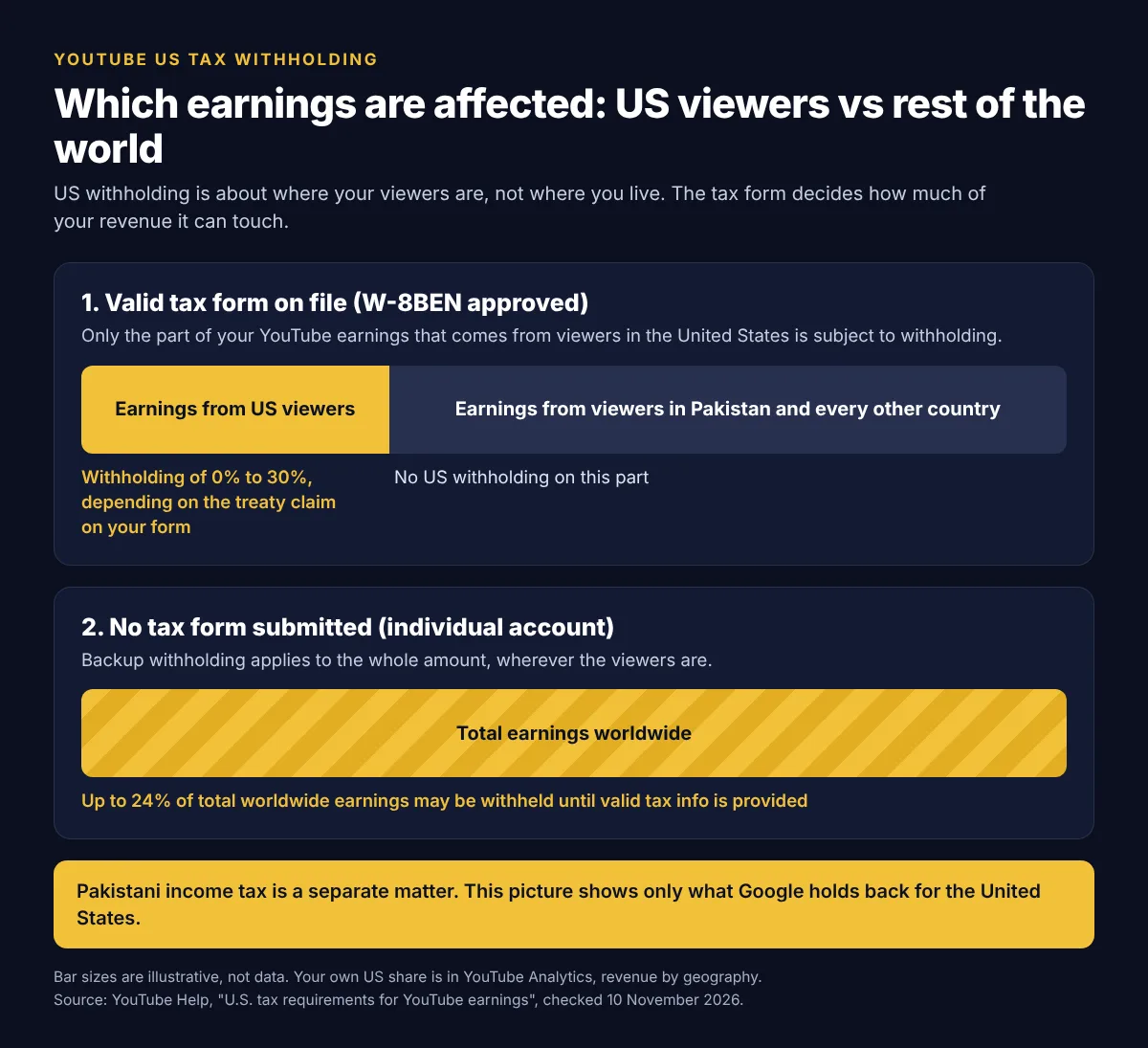
| Your situation | What Google says it withholds | Applied to |
|---|---|---|
| Approved form, treaty benefit claimed | The treaty rate for your country, anywhere from 0% to 30% | Earnings from US viewers only |
| Approved form, no treaty benefit | 30% | Earnings from US viewers only |
| No form, individual account type | Backup withholding of 24% | Total earnings worldwide |
| No form, business account type outside the US | Default rate of 30% | US earnings |
All four rows come from the same YouTube Help page. Google adds that these default rates are adjusted in the next payment cycle once you provide valid tax info.
A worked example
Google gives its own hypothetical example with a creator in India who earns $1,000 in a month, $100 of it from US viewers. With no tax info the deduction is $240. With a form and India’s treaty rate of 15% it is $15. With a form but no treaty benefit it is $30.
Here is the same logic for Pakistan. This is my own hypothetical example, not real channel data. Say a channel earns $500 in a month and $50 of that comes from US viewers.
| Scenario | Calculation | US tax withheld |
|---|---|---|
| No tax form submitted | Up to 24% of $500 | Up to $120 |
| Form approved, no treaty claim | 30% of $50 | $15 |
| Form approved, treaty claim shows 0% | 0% of $50 | $0 |
The third row depends on the rate your own account shows after submission. I explain where that 0% comes from next.
Does Pakistan have a tax treaty with the USA for YouTube income?
Yes, a treaty exists. Pakistan is on the IRS list of United States income tax treaties, A to Z, which is the same page Google links to from its Help articles. The document is the 1957 income tax convention, which entered into force on 21 May 1959.
The more useful question is what rate applies to YouTube money. Here is exactly what the official sources say:
- Google classes YouTube Partner Program earnings as “Other Copyright Royalties” in the tax tool, and AdSense as “Services” (YouTube Help, Submitting your U.S. tax info).
- The IRS Tax Treaty Table 1 (revised May 2023) lists Pakistan with a rate of 0 for copyright royalties (income code 12), citing treaty Article VIII(1). The general rate without a treaty is 30%.
- Article VIII(1) of the treaty text says that any royalty “(other than royalties or rentals from motion picture films)” paid for the use of “any copyright, patent, design, secret process or formula, trademark, or other like property”, and derived from one country by a resident of the other country “not having a permanent establishment” there, “shall be exempt from tax” by the first country.
So for copyright royalties, the IRS table shows 0% for a resident of Pakistan. Three honest limits on that statement:
- I cannot see your AdSense account. Google says the tax tool “will identify the details” of the treaty during submission, and your actual rate appears under “United States tax info” afterwards. Trust that screen over any article, including this one.
- The exemption is for a resident of Pakistan with no permanent establishment in the US. The IRS table itself warns that it is not a full guide to eligibility.
- For the “Services” income type I could not confirm a rate from the IRS table, which covers income other than personal services. The form shows it after you select your country.
You may also see older Pakistani news articles that assume a 5% rate. I found no official source for that figure.
Where the tax form is in AdSense for YouTube
Google lists the same path on both its YouTube Help and AdSense Help pages:
- Sign in to your AdSense for YouTube account (or your AdSense account).
- Click Payments, then Payments info.
- Click Manage settings.
- Scroll to “Payments profile” and click the edit icon next to “United States tax info”.
- Click Manage tax info. Google says this page has a guide that helps you select the right form.
Two small points from Google that save trouble. Its payments center help recommends doing this on a laptop or desktop, not a phone. And the fields accept only Latin letters, numbers, spaces, hyphens and ampersands, so no Urdu script anywhere.
W-8BEN or W-8BEN-E: which form will you get?
You do not pick the form from a list. Google says the form “is automatically generated based on the answers you provide”. The outcome usually looks like this:
| Who you are | Form | Note from Google or the IRS |
|---|---|---|
| Individual outside the US who owns the income | W-8BEN | Can be used to claim a treaty benefit |
| Company or other entity outside the US | W-8BEN-E | Entities claiming a treaty must also certify the limitation on benefits clause |
| US citizen or other US person, wherever you live | W-9 | The IRS says a US citizen should not complete W-8BEN, even with a second citizenship |
Google defines an individual account as one “owned and operated by an individual person and not a legal organization”. If your AdSense payments profile is in your own name, you are an individual for this purpose, even if you think of your channel as a business. If it is in the name of a registered company, the entity form applies and I would get an accountant involved.
AdSense tax form Pakistan: field by field walkthrough (W-8BEN)
This table is built only from Google’s Help pages and the IRS Instructions for Form W-8BEN. Google’s tool asks for the same information as the IRS form lines, but I am not describing its screens one by one, because they change. Anything that is my own practical advice is labelled.
| Field | What to enter | Common mistake |
|---|---|---|
| Name (line 1) | Your legal name, “exactly as it appears on your legal documents” (Google). Latin letters only. | Typing the channel name or a nickname. Google lists a legal name that does not match the payments profile as a common reason for review. |
| DBA name | Only if you have a business name to associate with the form. Google describes it as a company name different from the owner’s name. | Putting your channel name here for no reason. My advice: leave it empty unless your payments profile is under a business name. |
| Country of citizenship (line 2) | Pakistan, if that is your citizenship. Dual citizens enter the country where they are both a citizen and a resident (IRS). | A US citizen filling W-8BEN. The IRS says to give Form W-9 instead. |
| Permanent residence address (line 3) | Your home address in the country where you are resident for income tax (IRS). | A PO box, an “in care of” address or a bank address. A US address on a W-8 also triggers a review (Google). |
| Mailing address (line 4) | Only if it is different from line 3 (IRS). | Entering a US forwarding address. You would then need to prove you are not a US person (Google). |
| US TIN: SSN or ITIN (line 5) | Only if you actually have one (IRS). | Inventing a number or entering your CNIC here. My advice: most creators in Pakistan have no US TIN and use the foreign TIN field. |
| Foreign TIN (line 6a) | The tax number issued by your own country. Google says to check with your local tax authority. FBR states that for individuals the 13 digit CNIC is used as the NTN or registration number. | Claiming a treaty benefit with no TIN at all. Google says a treaty claim requires a foreign TIN or a US TIN. |
| Date of birth (line 8) | Your date of birth as on your CNIC. The paper IRS form uses MM-DD-YYYY. | Swapping day and month. My advice: follow the format the tool shows. |
| Treaty country (line 9) | The country where you are resident for treaty purposes. Fill this only if you are claiming a treaty benefit (IRS). | Selecting a country you do not live in to get a lower rate. |
| Income types and rates (line 10) | Google says to select all income types you are eligible to claim for: Other Copyright Royalties (YouTube Partner Program), Motion Picture and TV Royalties, Services (AdSense). The tool shows the treaty details. | Skipping the treaty section when you are eligible, which leaves the rate at 30% of US earnings. |
| Document preview | Google generates a PDF of the IRS form. You must check it for accuracy. | Not reading it. This is your last chance to catch a spelling error. |
| Certification and signature (Part III) | Your legal name as signature. The form is signed by the beneficial owner of the income (IRS). | Filling the “capacity” field. The IRS uses it for an agent signing for someone else, and Google reviews forms where it is filled. |
| US activities and affidavit | Answer truthfully. Google defines US activities as performing a service in the US, including employees or equipment there. The affidavit of unchanged circumstances lets Google apply a new form to an earlier period. | Ticking boxes without reading them. These are declarations, not formalities. |
One note on the foreign TIN. FBR’s rule that the CNIC serves as the NTN applies once you are registered with FBR. If you are not registered yet, sort that out first. Whether your number is acceptable on a US form is a question for a tax adviser, which is also what Google says.
After you submit: status and review
Google shows one of three statuses. “In review” can take up to 7 business days. “Approved” means the form was accepted. “Declined” means the tax info could not be validated, and you submit a new form.
If your form is flagged, Google may ask for an identity document. For an individual W-8BEN, its list of approved tax documents includes a passport, a national ID card and a driver’s licence, as PNG, JPEG or PDF.
If your payments are on hold for missing tax info, AdSense Help says to submit before the 20th of the month to be paid in that month’s cycle.
When the form expires and the 10 December check
A W-8BEN does not last forever. Google says tax forms “expire at the end of the third full calendar year, after the year of signing”, and gives the example of a form submitted in June 2021 expiring at the end of 2024. The IRS instructions say the same thing.
A W-8BEN does not last forever, so put the expiry year in your calendar and submit a new form before it runs out.
By my calculation from that rule, a form signed any time in 2023 expires on 31 December 2026, and one signed in 2024 expires on 31 December 2027. If you were monetized in 2023, check your status this month.
You must also resubmit earlier if your circumstances change in a way that affects the form, for example a move to another country. The IRS instructions give 30 days for that. If you change address, Google wants the “Permanent residence address” and the “Legal address” to match.
Google also asks every creator to check their tax info and claim any treaty benefit by 10 December each year. The date matters for refunds. If too much was withheld, Google may recalculate and refund the difference when you provide an updated form by 10 December, with valid info received before the end of the calendar year in which the tax was withheld. After that, a refund request goes directly to the IRS.
How to see the withholding in your reports
Do not look for it in YouTube Studio. Google states that “tax withholding amounts are not visible in YouTube Analytics”. Here is where each number lives:
- Your rate: in AdSense for YouTube, under the “United States tax info” section of your payments profile, visible after you submit the form.
- The amount actually withheld: in the payments transactions report in AdSense for YouTube. Google says amounts are usually visible in the month after payment, so April’s withholding appears in the report for May.
- Year end document: creators who submitted tax info and received eligible payments get a tax form such as Form 1042-S on or before 14 April for the previous year. You choose online or paper delivery under Manage tax info.
To estimate it yourself, Google suggests four steps: open the Revenue report in YouTube Analytics for the payment period, filter geography to the United States, find your withholding rate in AdSense for YouTube, then multiply the two. It is an estimate, not the final figure.
This is not your Pakistani tax
Keep the two things apart. The W-8BEN is a certificate you give to Google for US purposes. It does not register you with FBR, and it does not settle your tax in Pakistan.
Google says so itself: it is only required to withhold US taxes on earnings from US viewers, and “your local income tax laws may still apply to your YouTube earnings”. In Pakistan that means FBR and your annual income tax return. I am not going to quote rates here, because they depend on how you receive the money and how you are registered. A separate guide on this site covers tax for freelancers and creators, and a qualified tax adviser is the right person for your own case. If you also sell services to clients abroad, start with my freelancing in Pakistan guide.
If you are still building the channel, my YouTube automation in Pakistan guide has a short note on tax inside the bigger picture of costs and monetization, and the online earning in Pakistan hub lists the other income routes. If your channel earns from Shorts, read my guide to YouTube Shorts monetization in Pakistan for the rules that change on 1 February 2027.
Mistakes to avoid on the form
- Name mismatch. Use one spelling of your legal name everywhere: CNIC or passport, AdSense payments profile, tax form and bank account. Google says matching the form to the payments profile is the best way to avoid delays. The bank part is my own advice, because a different spelling there causes payment problems of its own.
- Wrong form type. An individual who answers as a company, or a company owner who answers as an individual, gets the wrong form. Answer based on who legally owns the AdSense payments profile.
- Claiming a treaty benefit you are not entitled to. The treaty is for residents of Pakistan. If you live and pay tax in another country, such as the UAE or Saudi Arabia, your country of residence is what counts, not your passport. You sign the form under penalties of perjury, so do not guess.
- Using a US or virtual address. It makes the form look like a US person’s and sends it to review.
- Letting someone else fill it with your login. Google says it never sends unsolicited messages asking for your password, and real emails come from @youtube.com or @google.com. My advice: never hand your AdSense login to an agent or a “tax form service” on WhatsApp or Facebook.
- Forgetting the expiry. Resubmit before the form runs out, so you do not fall back to the default withholding for accounts with no valid tax info.
Checklist before you click submit
- CNIC or passport in front of you, name typed exactly as printed
- Home address in Pakistan, no PO box, same as your payments profile
- Your tax number ready for the foreign TIN field
- Treaty section completed only if you are a resident of Pakistan
- PDF preview read line by line
- Status checked again after 7 business days, and the rate noted from “United States tax info”
- Reminder set for early December every year
YouTube US tax form FAQ
Do I need an ITIN or any US tax number to fill the form from Pakistan?
Not according to the IRS instructions. For a treaty claim you provide either a US TIN on line 5 or a foreign TIN issued by your own country on line 6a. An ITIN is a separate application to the IRS on Form W-7, and most creators outside the US never need one for this form.
My channel is with an MCN. Does this still apply to me?
Yes, but the process can differ. Google has a separate page on tax requirements for MCNs and affiliate channels. Ask your network how they handle the form before you assume it is done.
Can someone else in my family submit the form if the AdSense account is in their name?
The form must describe the person who legally owns the payments profile and the income, and that person signs it. If the account is in your father’s or brother’s name, the legal name, tax number and signature on the form are his, not yours.
I submitted the form late. Can I get back the 24% that was already deducted?
Possibly, within limits. Google says refunds are available in certain circumstances when valid tax info arrives in the same calendar year the tax was withheld, and the refund shows in the payment cycle after you update the form. For earlier years, Google says you have to file a refund request with the IRS yourself.
Does the form change how or when AdSense pays me?
Nothing in Google’s Help pages says it changes your payment threshold, payment method or monthly schedule. What changes is the amount withheld for the US. The one exception is a payment hold placed because required tax info is missing, which is lifted after you submit.
Fill the form once, carefully, and put the expiry year in your calendar. If you want structured next steps for growing the channel itself, my free playbooks and tools page are a good place to start, and you can send a specific question through Ask Ismail.
Keep reading
Related articles
 YouTube & AI · 15 min readYouTube Shorts Monetization in Pakistan: Requirements, 2027 Changes and PaymentsRead article →
 YouTube & AI · 19 min readReused Content on YouTube: How to Fix It and Get Monetized (2026)Read article →
 YouTube & AI · 27 min readYouTube Automation in Pakistan: How to Build a Faceless Channel with AI in 2026Read article →